


Image Link Generator: Simplify Your Image Sharing Process
- Image Generators
- November 1, 2024
- No Comments
A few years ago, sharing an image online was simple: upload it, attach it, send it.
Today? It’s a different game.
Marketers need fast-loading visuals, bloggers need SEO-friendly image URLs, developers need embed-ready links, and AI tools now generate thousands of images daily that must be hosted and shared instantly.
That’s exactly where an image link generator comes in.
In simple terms, an image link generator is a tool that uploads an image to the web and instantly converts it into a public, shareable URL, ready to use anywhere online.
Instead of sending bulky files like this:
IMG_2026.png (stored on your device)
And that tiny shift makes a massive difference.
What Is an Image Link Generator?
An image link generator is a tool that converts an uploaded image into a shareable web URL that can be accessed online. Instead of sending image files manually, it hosts the image on the internet and provides a direct link you can use in websites, social media posts, emails, or documentation.
In simple terms, it turns this:
Local file:image.png (stored on your device)
Into this:
Shareable link:https://example.com/image.png
The Power of Image Links: Why They Matter
Images have a powerful impact on the way we perceive information. Link generation related to images is equally vital, especially when we consider how we consume content today.
Here, we’ll explore why image links are important and how they enhance our online presence.
Enhancing User Engagement
Image links serve as gateways to content that captures attention. In a world inundated with information, visuals stand out. When properly utilized, image links can lead viewers to more intricate stories behind the images, detailed descriptions, or even product pages in e-commerce settings. This leads to greater user engagement, as visitors are encouraged to explore and interact with the content.
For instance, a travel blog featuring stunning photographs can use image links to redirect readers to articles about the destinations depicted. This natural flow from visual to textual content keeps users engaged longer, potentially increasing website traffic and dwell time.
Improving SEO Performance
Search engines are becoming increasingly sophisticated in evaluating content relevancy and quality. Images can significantly contribute to a web page’s SEO performance. Including descriptive alt text, strategic filenames, and utilizing image links increases the chances of appearing in search results.
When an image link is optimized correctly, search engines recognize the context of the imagery, leading to enhanced visibility. Thus, integrating an image link generator into your website can provide benefits beyond aesthetic appeal; it can also improve your site’s ranking potential.
Facilitating Social Media Sharing
Social media platforms thrive on visually compelling content. Image links enable seamless sharing across different channels, driving traffic back to the original source. By providing a clickable image link, users can easily share your content with their followers, broadening your reach.
Platforms like Instagram, Pinterest, and Twitter favor posts enriched with quality images. By using an image link generator to create attractive image links, you can ensure your visuals are not only seen but shared widely, thus amplifying your brand message.
Why This Tool Has Exploded in Popularity
In 2026, visuals are no longer optional, they are the backbone of digital communication.
Consider this:
- AI image creation tools generate millions of images daily
- Social platforms prioritize link-based media sharing
- Websites rely on externally hosted images for performance
- Remote teams need instant visual collaboration
That’s why platforms like TheAISurf have seen a surge in users searching for faster ways to create shareable image links.
Because today, it’s not just about having an image, it’s about making that image instantly usable anywhere on the internet.
Unlocking Image Links: Types and Applications
The versatility of image links cannot be understated, as they come in various forms and applications. Understanding these different types is crucial for effective implementation.
Direct Links vs. Thumbnail Links
Direct links lead users directly to the full resolution image. These links are often used when the primary goal is to showcase the image itself, such as in gallery websites or photography portfolios.
Thumbnail links, on the other hand, display a smaller version of an image while linking to a larger one. This method is commonly used in blogs and e-commerce sites, where users are shown a preview before making a decision to view or purchase the product. Both types have their unique advantages, depending on the context of use.
Hosted vs. Embedded Image Links
Hosted image links point to images stored externally, while embedded image links allow users to display images directly within their own websites or content. Using hosted links can save bandwidth and storage space, especially for high-traffic sites.
Embedded image links can be beneficial for forums and blogs where contributors want to share visuals without uploading them again. Understanding when to use each type can make a significant difference in site performance and user experience.
Temporary vs. Permanent Links
Temporary image links, also known as expiring links, are created with a set lifespan. They may be useful for sharing promotional imagery or limited-time offers, ensuring that the links do not clutter your site over time.
Permanent links remain active indefinitely and are ideal for standard content, such as product images or profile photos. Choosing between temporary and permanent links should depend on the context and purpose of the image.
DIY Image Link Generators: Tools and Resources
If you’re looking to create your own image links, there are numerous tools available that facilitate this process. Below are some resources and solutions to help you get started.
Online Image Hosting Services
Many online platforms offer hosting services that automatically generate image links. Websites like Imgur, PostImage, and Flickr provide users with the ability to upload their images and receive immediate links.
These platforms vary in terms of features, such as privacy settings and additional editing tools. Explore multiple options to find a service that aligns with your needs.
Content Management Systems
Popular CMSs such as WordPress have built-in functionalities that enable easy image uploads and link generation. By simply uploading images through the media library, you can obtain direct links and embed them into your posts seamlessly.
Additionally, plugins can enhance this functionality, allowing for bulk uploads and advanced customization of image links.
Custom Scripts and Code
For those with technical expertise, creating custom scripts to generate image links can be empowering. Utilizing languages like JavaScript or Python, developers can build personalized link generators tailored to their specific requirements.
Such custom solutions can streamline workflows and cater to unique needs that off-the-shelf products may not fulfill.
Leveraging APIs for Image Link Generation
Application Programming Interfaces (APIs) can take your image link generation capabilities to a higher level. By integrating APIs, you can automate processes and achieve more complex tasks.
Integrating Third-Party Image APIs
Services such as Unsplash and Pexels provide APIs that allow users to access vast libraries of high-quality images programmatically. By incorporating these APIs into your projects, you can dynamically pull images and generate links based on user queries.
This approach not only enhances user experience but also ensures that you have fresh and relevant visuals at your disposal.
Building Custom APIs for Image Management
If you require a highly specific image link generation system, developing a custom API could serve your needs. This would involve designing a backend system capable of managing images, generating links, and even monitoring analytics related to link usage.
While this option requires a significant investment of time and resources, the result could be a robust solution uniquely catered to your organization’s requirements.
Automating Image Links through Webhooks
Webhooks can be employed in conjunction with APIs to create real-time links for images uploaded to your platform. By setting up webhook notifications, you can receive immediate alerts when new images are added, enabling instant link generation.
This functionality can be particularly beneficial for platforms that rely heavily on user-generated content, ensuring that new visuals are promptly linked and accessible.
Beyond Basic Links: Customizing Image Links
Creating image links is just the beginning; customizing them can significantly elevate your strategy. There are several ways to personalize image links to reflect your brand and engage your audience.
Adding Tracking Parameters
By appending tracking parameters to your image links, you can gather valuable insights about user interactions. Analytics tools like Google Analytics allow you to monitor clicks and conversions directly tied to specific image links.
This data is vital for understanding what resonates with your audience and optimizing your visual content accordingly.
Creating Branded Image URLs
Aesthetic consistency is paramount in branding. Customizing your image links to include your brand name or keywords can enhance recognition and foster trust. For example, using a subdomain related to your brand can project professionalism and make your links memorable.
Enhancing Accessibility
Custom image links can also be designed with accessibility in mind. Including descriptive alt text within your image links can aid users who rely on screen readers, ensuring that your visuals reach a broader audience.
Furthermore, providing different sizes of images can cater to varying bandwidths and device capabilities, ensuring an inclusive experience for all users.
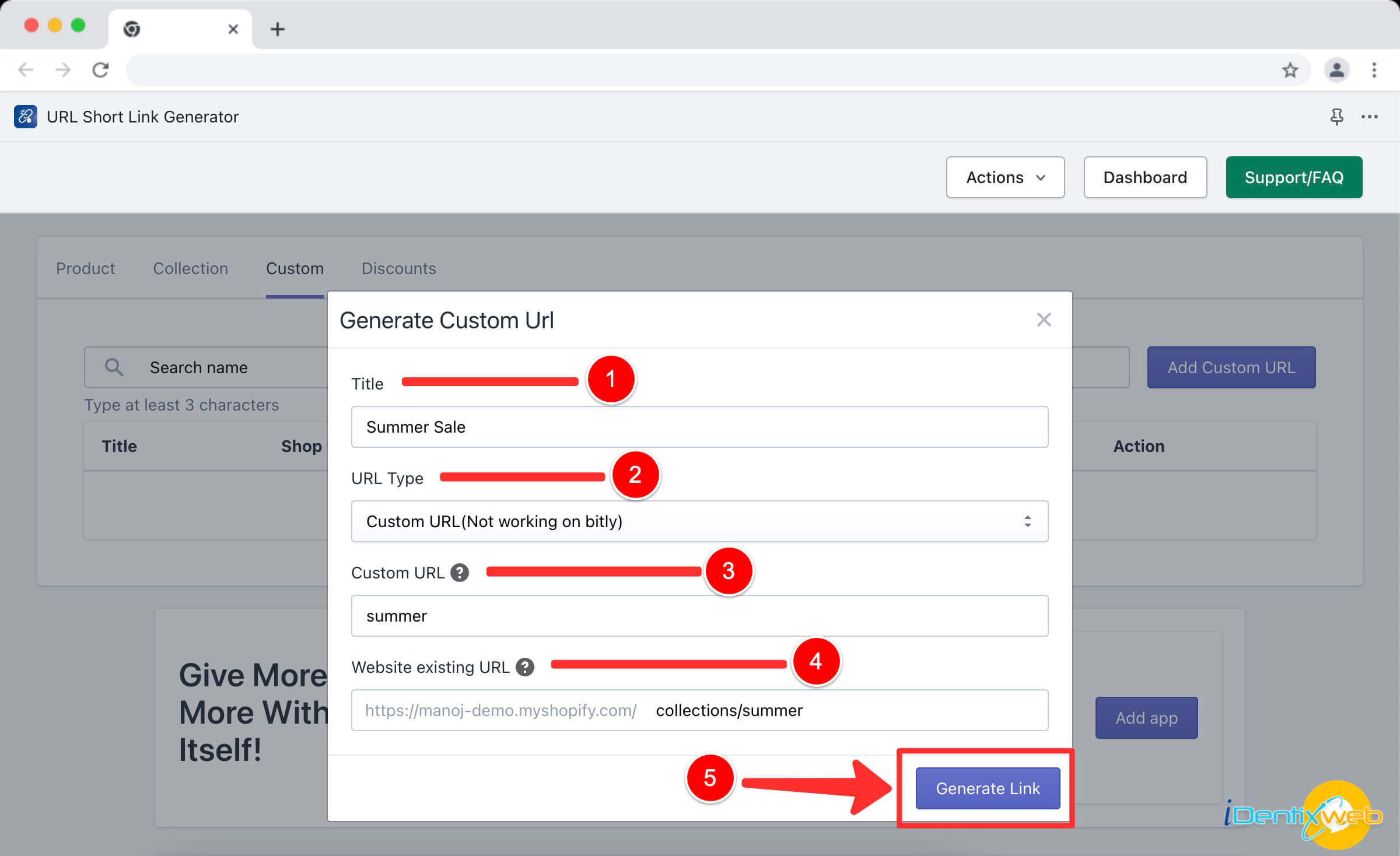
How to Generate an Image Link (Step-by-Step)
Step 1 — Upload Your Image
Use any image hosting tool like:
- Imgur
- Cloudinary
- Postimages
Click Upload Image
Step 2 — Choose Link Type
Most tools provide:
- Direct link
- HTML embed link
- Markdown link
- Social share link
Best for SEO: Direct URL
Step 3 — Copy the Generated Link
Example:
https://imgur.com/abc123.jpgStep 4 — Use the Link Anywhere
You can paste it into:
- Blog posts
- Social media
- Emails
- Documentation
- Forums
BEFORE vs AFTER Example
Before (No Image Link Generator)
- Image stored locally
- Cannot share easily
- Not SEO-friendly
C:\Users\image.pngAfter (Using Image Link Generator)
- Hosted online
- Shareable anywhere
- Optimized for web
https://imagehost.com/sample.pngBest Practices for Image Links: Optimization and Performance
To maximize the effectiveness of your image links, adhering to best practices is essential. Proper optimization can greatly influence load times, user experiences, and overall performance.
Compressing Images for Quick Loading
Large image files can slow down page loading times, negatively impacting user experience and SEO. Utilizing compression tools can reduce file size without sacrificing quality, allowing images to load quickly.
Tools like TinyPNG and ImageOptim can streamline this process, ensuring that your site remains responsive while still displaying high-quality visuals.
Implementing Lazy Loading Techniques
Lazy loading is a technique where images are only loaded when they enter the viewport. This practice improves page speed and reduces initial load times, particularly on pages with multiple images.
By implementing lazy loading, you optimize performance and enhance user experience, encouraging more prolonged interactions with your content.
Regularly Auditing Your Links
Over time, image links can become outdated or broken, leading to a poor user experience. Conduct regular audits of your links to ensure they are still active and relevant.
Utilizing tools like Screaming Frog can help identify broken links, enabling you to maintain a smooth browsing experience for your audience.
Prompt Templates
Prompt Templates to Generate Image Links with AI Tools
Prompt 1 — Basic
Upload this image and generate a direct public URL link for sharing.
Prompt 2 — For Markdown Users
Create a markdown-ready image link for this uploaded image.
Prompt 3 — For SEO Optimization
Generate an optimized image link with alt text, title tag, and embed code.
Prompt 4 — For Social Sharing
Create a short, shareable image URL optimized for social media posting.Image Link Generator: Use Cases and Examples
Understanding how to apply an image link generator effectively is crucial for any digital strategy. Here are various use cases that illustrate its practical applications.
E-Commerce Product Catalogs
Online retailers frequently rely on image link generators to create engaging product catalogs. By linking product images to corresponding item pages, they facilitate a seamless shopping experience for users.
Additionally, having high-quality product images linked correctly can entice customers to make purchases, leveraging the power of visual merchandising.
Portfolio Websites for Creatives
For photographers, artists, and designers, image link generators are invaluable. They allow creatives to showcase their work online, linking images to detailed descriptions or purchase options.
By providing viewers with the ability to click through to their complete portfolios, they enhance their chances of attracting commissions or sales.
Educational and Informational Content
Bloggers and educators often employ image link generators to enrich their posts. By linking images to in-depth articles or research papers, they can offer more context and encourage further reading.
This practice not only adds value to the content but also positions the creator as a knowledgeable resource in their field.
Troubleshooting Guide
Common Image Link Generator Problems (And Fixes)
Problem: Link Not Working
Cause: Image not publicly hosted
Fix:
- Enable public sharing
- Check file permissions
Problem: Image Not Loading
Cause: Wrong file format
Fix:
- Use JPG, PNG, or WebP
Problem: Link Too Long
Cause: Hosting platform URL structure
Fix:
- Use link shorteners like Bitly
Problem: Link Expired
Cause: Temporary hosting services
Fix:
- Use permanent image hosting tools
Security and Ethical Considerations with Image Link Generators
As with any digital tool, there are security and ethical implications associated with using image link generators. Being aware of these issues is critical for responsible usage.
Protecting Copyrighted Material
When utilizing images from external sources, it’s essential to respect copyright laws. Failing to do so may lead to legal ramifications. Always ensure that you have permission to use or link to someone else’s images and give credit where appropriate.
Utilizing public domain images or images with Creative Commons licenses can alleviate concerns surrounding copyright infringement.
Avoiding Malicious Links
Link generation can inadvertently lead to malicious activity if not managed carefully. Ensure that your image links direct users to safe and reputable sites by regularly auditing them for security threats.
Using HTTPS for your links also contributes to enhanced security, building trust with your audience.
Establishing Ethical Standards
Transparency is key when it comes to ethical considerations. Make it clear to users where your images originate from and if any affiliate relationships exist regarding the products being promoted.
By maintaining transparency and ethical standards, you foster trust and credibility with your audience.
Pro Tips for Creating Perfect Image Links
Tip 1 — Always Use Permanent Hosting
Avoid temporary upload sites.
Tip 2 — Optimize Image Size First
Smaller images load faster.
Tip 3 — Add SEO Alt Text
Helps search engines understand the image.
Tip 4 — Use HTTPS Links Only
Ensures secure sharing.
Tip 5 — Choose Direct Image URL
Avoid preview page links.
The Future of Image Link Generators: Trends and Innovations
The digital landscape is continually evolving, and so too are the tools we use to navigate it. As technology advances, image link generators are poised to adopt new trends and innovations.
AI-Powered Image Recognition
Artificial intelligence is increasingly being integrated into various online platforms. Future image link generators may harness AI-powered image recognition technologies to automate the identification and tagging of images, streamlining the link generation process.
This development could significantly enhance efficiency and accuracy in managing large volumes of images.
Augmented Reality and Interactive Links
With the rise of augmented reality (AR), image links could evolve to incorporate interactive experiences. Imagine clicking on an image that leads users to a virtual tour of a property or an interactive review of a product.
Such innovations could redefine how brands present themselves and engage with consumers.
Evolving Social Media Integration
As social media continues to expand, image link generators may adapt to support emerging platforms and features. This could include easily shareable image links that automatically conform to the specifications of various platforms, maximizing reach and engagement.
Keeping pace with social media trends will be crucial for marketers and creators looking to stay relevant in a rapidly changing landscape.
Relevant Reads:
Conclusion
An image link generator is more than just a tool for creating hyperlinks to images; it is a gateway to unlocking the full potential of your visual content. From enhancing user engagement and supporting SEO strategies to facilitating social media sharing, the power of image links cannot be overstated.
Whether you choose to utilize DIY methods, leverage APIs, or customize your links, being informed about the best practices and ethical considerations will help you maximize the effectiveness of your image links.
As the digital landscape evolves, staying abreast of trends and innovations in image link generation will ensure that you remain competitive and relevant in your field. Embrace the future of image link generation to unleash creativity, foster connections, and elevate your digital content strategy.
Looking to learn more? Dive into our related article for in-depth insights. Plus, discover more in our latest blog post on Image Caption Generator Keep exploring with us!
Related Tools You May Like
Also explore the full directory here.
You can explore an AI tools directory to discover useful platforms for AI candidate screening, along with practical AI courses for beginners to build your skills from the ground up.
FAQs About Image Link Generators
1. What does an image link generator do?
An image link generator uploads your image to the internet and creates a public URL that you can share anywhere online.
2. Are image link generators free to use?
Yes, many tools offer free image link generation, though some provide paid plans for storage, analytics, or advanced features.
3. Can I use image links on websites and social media?
Absolutely. Generated image links work on blogs, social platforms, emails, forums, and documentation.
4. What image formats are supported?
Most tools support common formats like JPG, PNG, GIF, and WebP.
5. Do image links expire?
It depends on the hosting platform. Some temporary hosts expire links, while permanent hosting services keep them active indefinitely.
6. Is using an image link generator safe?
Yes, as long as you use trusted platforms and avoid uploading sensitive or private images.
7. Can image links help with SEO?
Yes. Direct image URLs can improve website speed, indexing, and content visibility when used correctly.
8. What is the best way to generate an image link quickly?
The fastest method is using online tools listed on TheAISurf that allow instant upload and one-click link creation.