


Best QuillBot Alternative To Paraphrase Text Online
- Paraphraser
- September 15, 2025
- No Comments
When it comes to paraphrasing text online, we all know that QuillBot stands out as the brand. It possesses robust paraphrasing capabilities, ensuring excellent text quality and precision.
However, it comes with a few downsides. For instance, it offers a 125-word limit for free without account registration.
That’s the reason why people often search for a reliable QuillBot Alternative that offers the same paraphrasing quality along with a good word limit. If you are also one of those, then your search ends here.
After spending hours on research and testing multiple options, I found a quite decent paraphrasing tool – Editpad. I personally believe it is the best alternative to QuillBot. Thinking how? Then continue reading.
Editpad – The Best QuillBot Alternative for Text Paraphrasing
Editpad is basically an online platform that offers a wide suite of writing tools, including a freemium paraphrasing tool. It claims to operate on a diverse set of AI algorithms to ensure maximum speed and accuracy while paraphrasing text online.
Whether it’s a blog, a research paper, an essay, a product description, a business proposal, or an email, Editpad can help you produce a well-written, rephrased version of it in no time.
Key Reasons That Editpad Is an Excellent QuillBot Alternative
Here are some of the primary reasons that make the Editpad paraphrasing tool a decent alternative to QuillBot.
Offers Multiple Modes
QuillBot offers a range of paraphrasing mode, and Editpad paraphraser also comes equipped with 12 rephrasing modes. The names are: Standard, Smooth, Reworder, Formal, Simple, Fluency, Creative, Natural, Improver, Academic, Expander, and Shorten.
Each mode is designed to adjust the given content’s tone for a specific type of writing. Below, I have attached a screenshot; check it out.
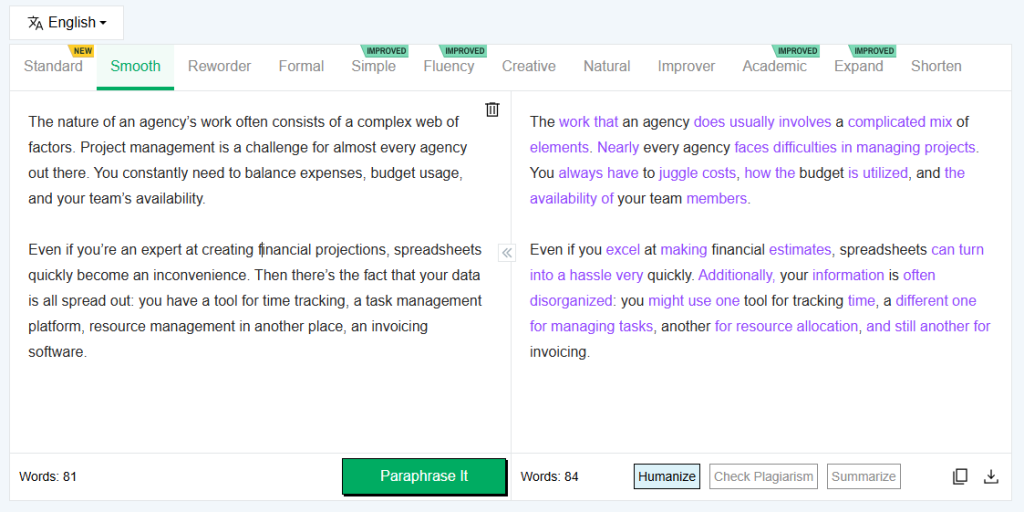
However, it is important to note that only four modes are available for free users. QuillBot offers 2 modes for free users, so Editpad takes the lead here.
Option to Further Paraphrase Text
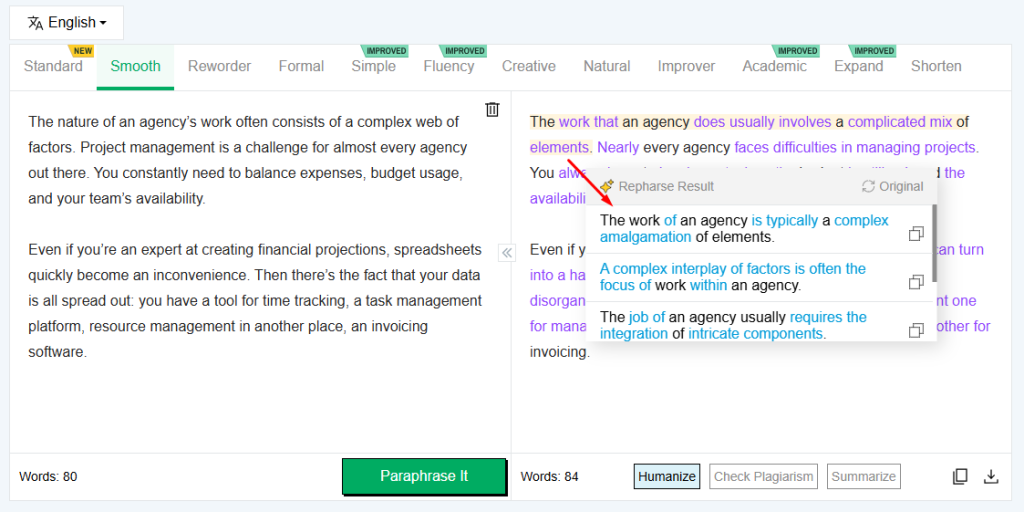
The heading is already providing a clear idea – Just like QuillBot, Editpad also provides the option to further rephrase the output text, in case you are not satisfied with any sentence. All you need to do is simply click on the sentence that you want to change.
After clicking, a drop-down menu will appear displaying multiple unique variants of that specific sentence. You can select any that you find more contextually appropriate. See the screenshot below as a reference.
Multilingual Support
QuillBot paraphrasing tools support more than 25 international languages. Whereas Editpad allows users to rephrase content in more than 30 languages. This makes it a really versatile free option for audiences worldwide.
Adequate Word Limit
As mentioned earlier, QuillBot allows free paraphrasing of up to 125 words at once. While Editpad comes with a limit of 1,000 words in one go, which is way more than enough…right?
With such a decent limit, you don’t have to divide your content into sections to stay within the mentioned limit.
So, I think these are a few major reasons that make Editpad a pretty decent alternative to QuillBot.
Some Other Features of Editpad to Watch Out For
Below, we have discussed a few other features that make Editpad a good option.
Availability
Editpad is available in both free and paid versions. The free version has no usage restrictions except word count and mode. Additionally, it does not require sign-up or registration; instead, simply land and start paraphrasing text online.
Text Highlighting
Editpad highlights the changed words and phrases in the output box, just like QuillBot. This way, it becomes easier for you to compare both the original and rephrased content.
Integration of Other Writing Tools
Along with online paraphrasing, Editpad also integrates multiple other AI writing tools, including an AI Humanizer, Plagiarism Checker, and Text Summarizer. You can process the paraphrased content through any of these tools as per your specific needs and requirements.
Pricing
Just like QuillBot, Editpad also has a paid plan, especially for users who want to enjoy the premium perks. The good thing is that Editpad offers multiple plans for users with different budget requirements.
Below, we have briefly mentioned the details of different plans:
- Weekly – $5.99
- Monthly – $12.99
- Yearly – $125
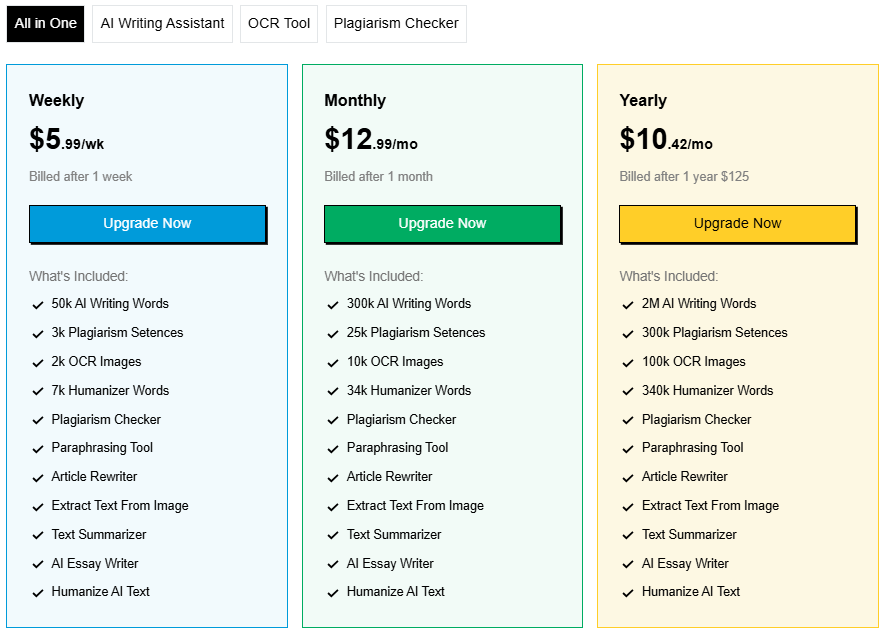
Each plan will not only unlock premium access to the paraphrasing tool, but also to other writing tools offered by Editpad. Some of the notable ones include: Plagiarism Checker, Text Summarizer, Humanizer, Essay Writer, and many more.
Ending Notes
QuillBot is no doubt a decent option for paraphrasing text online. However, due to its word-count limitation and other downsides, people often look for a more suitable alternative.
Editpad is one such AI Marketing tool that they can consider using as an alternative paraphraser. It offers almost similar features and capabilities to QuillBot, along with a good input text limit (1000).
In this article, I have explained how Editpad has become the best alternative to QuillBot in detail. This wraps up the review of Editpad as a QuillBot alternative.
