


50 AI Tools to Finish Hours of Work in Minutes
- AI
- September 29, 2025
- No Comments
Ever felt like your to-do list is mocking you? Same. That’s why I keep a running arsenal of AI tools that shave off hours of grind. Whether it’s writing, designing, or transcribing—AI now handles the heavy lifting so you can get back to strategy, creativity, or, honestly, Netflix.
In this post, I’ve grouped 50 AI tools by category—so you don’t waste time hunting. Bookmark this. Share it. Come back when you’re drowning in tasks. These are the ones that’ll actually save you time.
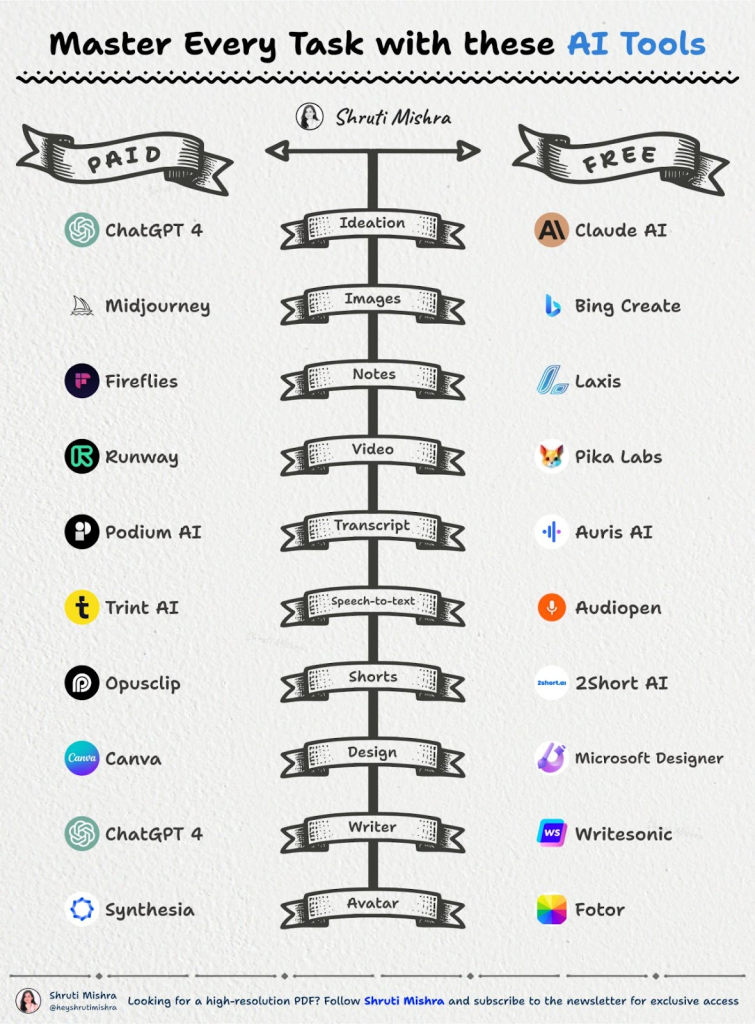
Source: Linkedin User
1. AI for Ideas & Research
When your brain feels like dial-up internet, these tools kickstart it:
- Claude AI – Long-form clarity.
- ChatGPT-4 – Still king for brainstorming.
- Bing Chat – Built-in search edge.
- Perplexity – Cites sources on the fly.
- Better Research – Niche digging.
(Pro tip: Pair ChatGPT with Perplexity—you get speed + facts.)
2. AI for Images
Need visuals without bugging a designer? Done.
- Midjourney – Gorgeous, artistic results.
- Bing Create – Free DALL·E-based magic.
- Leap AI – Custom generative art.
- Astira AI – Hyper-detailed scenes.
- Stable Diffusion – Open-source powerhouse.
3. AI for Notes
Stop pretending you’ll “remember it later.”
- Fireflies – Meetings transcribed.
- Laxis – Context-aware summaries.
- Otter – Real-time note buddy.
- Notion AI – Inside your workflow.
- Evernote – Now AI-powered.
4. AI for Video Creation
Because attention spans = shrinking.
- Runway – AI video editing beast.
- Pika Labs – Text-to-video experiments.
- Eightify – Summarizes YouTube in seconds.
- InVideo – Templates on steroids.
- Morphstudio – Creative storytelling.
5. AI for Transcripts & Speech-to-Text
No more manual rewinds.
- Podium AI – Podcast transcripts.
- Auris AI – Accurate multi-language.
- Rev – Human + AI hybrid.
- Otter – Shows up everywhere.
- Sonix / Trint / Descript / Audiopen – Fast, polished text
6. AI for Shorts & Clips
Short form rules the algorithm.
- OpusClip – Viral clip maker.
- 2Short AI – Turns long videos short.
- CapCut – TikTok’s best friend.
- Vidoomy – Social media edits.
7. AI for Design
Make it pretty, fast.
- Canva – Still unbeatable.
- Microsoft Designer – Smart templates.
- Flair AI – Product mockups.
- Clipdrop – Background remover, textures.
- Fotor – Simple but solid.
(Want more visual hacks? Try our AI image citation generator for clean attributions.)
8. AI for Writing
Blank page? Fixed.
- ChatGPT-4 – Conversational + versatile.
- Writesonic – SEO-ready drafts.
- Jasper – Brand-friendly copy.
- Copy.ai – Fast marketing text.
- LongShot AI – Research-heavy content.
9. AI for Avatars
Because sometimes you don’t want to be on camera.
- Synthesia – AI presenters.
- Fotor – Quick avatars.
- Ready Player Me – Metaverse-ready.
- Zepeto – Social avatars.
- Vroid Studio – Anime 3D models.
Conclusion
The fastest way to finish work with AI is by using specialized tools for each task: ChatGPT, Claude, and Perplexity for ideas; MidJourney and Stable Diffusion for images; Fireflies and Otter for notes; Runway and InVideo for video; and Canva and Microsoft Designer for design. Together, these 50 tools cut hours of manual work into minutes.
That’s the full list: 50 AI tools that turn hours of work into minutes. You don’t need all of them—just pick the 2–3 that fit your workflow and master them.
Pro move: stack them. Example—Perplexity for research + ChatGPT for drafting + Canva for visuals = one finished project in under an hour.
Explore more game-changing AI tools at TheAISurf.
Relevant Reads:
AI Marketing Agency Killer Prompt
15 AI Websites So Good You’ll Wish You Found Them Sooner
FAQs
Q1: What’s the best all-in-one AI tool for productivity?
If you want one tool, start with ChatGPT-4—it covers writing, ideas, summarizing, and brainstorming. Pair it with Canva (for visuals) and Otter (for notes) for a full-stack workflow.
Q2: Are these AI tools free?
Most offer a free plan or trial. Tools like Bing Create, Perplexity, and Canva free tier go a long way. Paid tiers add pro features (HD exports, longer outputs, etc.).
Q3: How do I know which AI tool to use?
Start with your pain point. Need images? Try Midjourney. Struggling with videos? Runway or InVideo. Overwhelmed by meetings? Otter or Fireflies. Match the tool to the bottleneck.