


OCR In PDF Editors- Document Management | AI Text Recognition
- Foxit PDF Editor PDF Editor
- October 8, 2025
- No Comments
Managing large volumes of documents efficiently is crucial for businesses, educators, and everyday users alike. OCR in PDF editors, AI text recognition or, scan and edit PDFs has emerged as a transformative technology, enabling users to convert scanned images and paper documents into editable, searchable files seamlessly.
This integration not only enhances productivity but also simplifies workflows, allowing for quick editing, data extraction, and sharing. Whether you’re digitizing old archives or managing contracts, understanding how OCR in PDF editors and AI-driven tools revolutionize PDF handling is essential for staying ahead in the digital landscape.
OCR in Modern PDF Editors
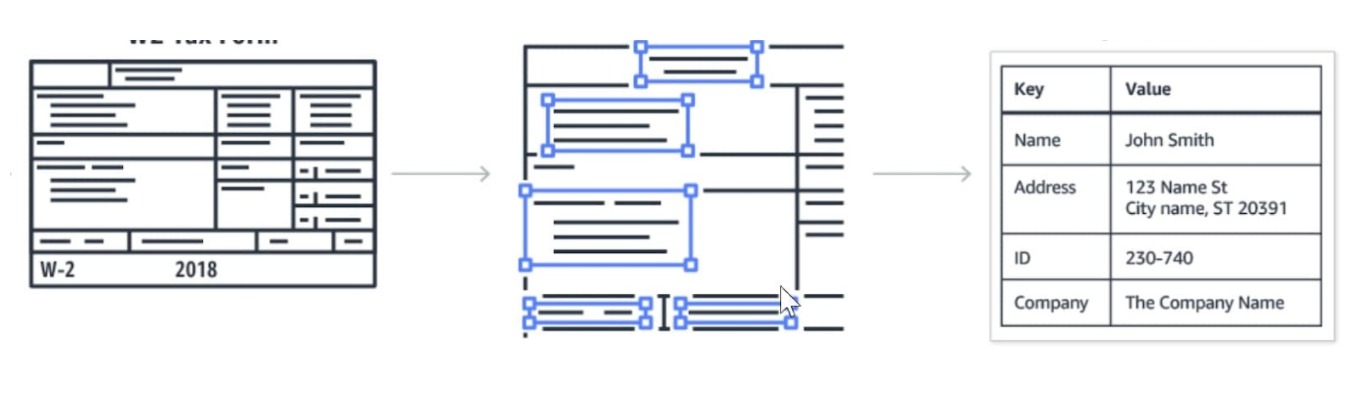
Optical Character Recognition (OCR) has long been the backbone of converting printed or handwritten text into editable digital content. Modern PDF editors leverage OCR to unlock the full potential of scanned documents, transforming static images into dynamic files. This ability to read and interpret text embedded within images means users can now search within documents, copy text, and even translate content instantly, saving hours traditionally spent on manual data entry.
What makes OCR in PDF editors particularly powerful today is the integration of machine learning algorithms. These advancements allow the software to adapt to various fonts, handwriting styles, and image qualities, increasing recognition accuracy.
As a result, professionals and casual users can work more efficiently without concern for errors or the need for extensive manual corrections, marking a significant leap from early OCR in PDF editors tools that often struggled with complex layouts.
AI for Text Recognition in PDFs

While traditional OCR focuses on recognizing characters from images, AI-driven recognition takes things a step further by understanding context, structure, and semantic meaning. AI in PDF editors enables the software to distinguish headings from body text, recognize tables, and even identify key data points within complex layouts. This contextual understanding significantly improves the quality of digital conversions and makes editing a more intuitive process.
Moreover, AI-powered text recognition improves over time through machine learning, providing increasingly accurate results with repeated use. It offers capabilities such as language detection, handwriting recognition, and even translating text within PDFs.
Such features empower users to work with diverse documents—be it a handwritten note or a multilingual report—without sacrificing accuracy or productivity, thus broadening the scope of what can be achieved with digital document management.
Scan, Recognize, and Edit: Streamlining PDF Workflows with OCR and AI
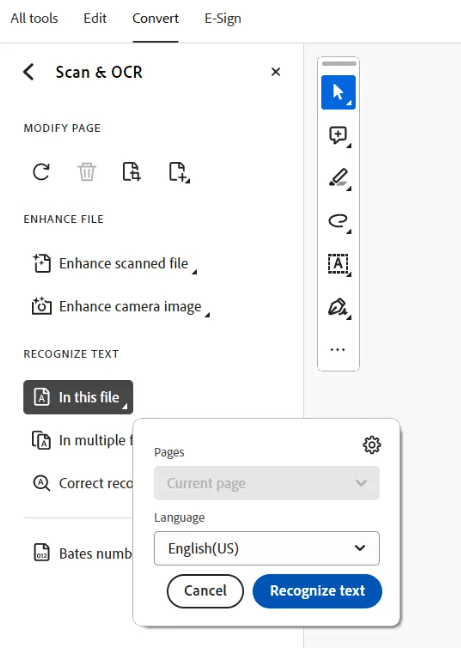
Integrating OCR in PDF editors and AI into PDF workflows transforms traditional document management into a streamlined, almost effortless process. Instead of laboriously re-typing text from scanned images, users can simply scan documents, run OCR recognition, and edit the content immediately. This seamless process reduces errors, saves time, and improves collaboration, especially in environments where document accuracy is paramount.
Additionally, the ability to scan and edit PDFs on the fly makes workflows more flexible. For example, legal firms can quickly digitize, annotate, and redact sensitive material, educational institutions can convert handwritten notes into usable digital resources, and businesses can automate data entry from forms and invoices. This integration ultimately creates an ecosystem where information flows smoothly, efficiently bridging the gap between physical and digital worlds.
OCR in PDF Editors and Text Extraction
Understanding the core of OCR technology reveals why it’s so transformative for PDF editing. At its foundation, OCR in PDF editors employs image processing algorithms to identify characters within a scanned document. Advanced OCR systems utilize pattern recognition, machine learning, and neural networks to improve recognition accuracy, especially in challenging scenarios like poor lighting, skewed scans, or unusual fonts.
In terms of text extraction, OCR in PDF editors enables users to convert image-based PDFs into fully searchable and editable files. This process involves detecting text blocks, recognizing individual characters, and reconstructing the content in formats compatible with word processors, spreadsheets, and database systems.
Mastering OCR technology means mastering efficient data digitization—a skill increasingly essential in data-driven decision-making and modern workflows.
AI-Powered Text Recognition: Enhancing Accuracy and Efficiency in PDF Processing
AI-powered text recognition surpasses traditional OCR by incorporating intelligence that mimics human understanding. This allows the system to handle ambiguous characters, correct errors automatically, and even recognize contextual clues to maintain document integrity. For instance, in recognizing technical or scientific jargon, AI can adapt better than standard OCR in PDF editors, which might struggle with specialized vocabulary.
The focus on efficiency doesn’t just stop at accuracy. AI integration accelerates processing times and reduces manual validation. Some advanced systems automatically organize recognized text into structured formats like tables, headings, and captions, facilitating faster editing and analysis. This level of sophistication turns PDF editing from a tedious chore into a robust, intelligent task that complements professional workflows.
Choosing the Right PDF Editor with Advanced OCR and AI Capabilities
Selecting a PDF editor equipped with state-of-the-art OCR in PDF editors and AI features requires careful consideration of several factors. Primarily, users should assess the accuracy of text recognition, especially for complex layouts or handwritten content. Compatibility with various file formats and ease of use are equally important—intuitive interfaces save time and reduce user frustration.
Beyond basic capabilities, look for editors that offer batch processing, cloud integration, and customizable OCR in PDF editors settings. Security features, such as encryption and redaction, are also crucial for sensitive documents.
The right choice depends on your specific needs—whether you’re scanning legal documents, academic papers, or everyday memos—and investing in a tool with robust AI-enhanced OCR ensures long-term value and efficiency.
Transforming Scanned Documents with PDF OCR
The journey from paper to digitized content is made seamless with OCR in PDF editors technology. When scanning physical documents, the challenge often lies in translating inked or handwritten text into editable formats. PDF OCR tools excel at handling this task by accurately recognizing characters and reconstructing the layout, making old or paper-based documents instantly accessible and editable.
This transformation not only preserves valuable information but also enhances data accessibility. Once digitized, documents can be annotated, searched, and integrated into broader digital systems.
For businesses managing large archives, implementing OCR solutions means effortless back-end processing, improved collaboration, and the ability to extract insights from what once was static, unsearchable paper.
How AI is Revolutionizing Text Recognition in PDFs
Historically, OCR technology was limited by accuracy issues, especially with complex layouts and degraded images. Today, AI-driven OCR in PDF editors is revolutionizing this space, with continually improving algorithms that learn from vast datasets. This evolution means OCR systems are now capable of handling diverse documents—be it cursive handwriting, multilingual texts, or artistic fonts—with remarkable precision.
AI’s influence extends beyond recognition; it enhances workflows by enabling predictive text, correcting errors automatically, and adapting to user preferences. Consequently, the integration of AI into OCR systems marks a paradigm shift, transforming mere text recognition into intelligent, adaptive tools that redefine how we process, analyze, and utilize digital documents.
Tips and Tricks for Effective OCR and PDF Editing
Achieving peak efficiency with OCR and PDF editing tools relies on understanding best practices. Maintaining high scan quality—good lighting, straight alignment, and minimal noise—maximizes recognition accuracy. Before processing, cleaning up images with pre-editing features within PDF editors can significantly improve results, especially when dealing with old or poorly scanned documents.
Furthermore, regularly updating software ensures access to the latest AI improvements and recognition models. Utilizing batch processing capabilities and customizing OCR in PDF editors settings for specific document types can streamline tasks significantly.
Building these habits will ensure your digital workflow remains smooth, accurate, and adaptable, harnessing the full potential of OCR in PDF editors, AI text recognition or, scan and edit PDFs.
Future-Proofing Your PDFs: OCR and AI-Based Text Recognition
In a rapidly changing digital landscape, future-proofing your documents is more critical than ever. AI-based OCR in PDF editors ensures that your PDFs remain accessible, searchable, and editable long after their creation, safeguarding your data assets. As AI continues to advance, we can anticipate even more intelligent features—such as automatic translation, voice-to-text conversion, and enhanced data analysis—integrated into PDF workflows.
Investing in current OCR and AI technologies positions you favorably for these upcoming innovations, making your digital documents resilient against obsolescence. Whether for compliance, research, or operational efficiency, leveraging cutting-edge recognition tools ensures your PDFs are not just static images but dynamic, usable resources that evolve with your needs.
Relevant Reads:
Best PDF Editor 2025: Top Tools, Features, and Free Alternatives Compared
PDF Converter Tools – Word, Excel, and Images into Seamless PDFs
Conclusion
The integration of OCR in PDF editors, AI text recognition or, scan and edit PDFs has profoundly transformed how we handle digital and paper documents, making processes faster, more accurate, and highly flexible. By understanding the core principles of OCR technology and the ways AI enhances recognition, users can unlock new efficiencies and capabilities, from digitizing archives to automating complex workflows.
As technology evolves, embracing these innovations will be crucial for maintaining competitive advantage, securing data, and ensuring seamless document management—an exciting future where physical and digital worlds merge effortlessly.
Experience the Future of Document Management — Explore TheAISurf’s Top AI Tools for Effortless OCR and Text Recognition Today!