



ClickUp vs Monday – A Feature-by-Feature Comparison (2026 Update)
- ClickUp
- October 22, 2025
- No Comments
When it comes to choosing a project management tool, organizations find themselves weighing options between popular platforms like ClickUp vs Monday.com. Both tools have carved out prominent positions in the project management space, offering robust features tailored to different workflows, team sizes, and industry needs.
This article provides an in-depth comparison of clickup vs monday pricing, exploring their features, pricing, user experience, integrations, and more—helping you determine which platform is the best fit for your team’s unique requirements.
ClickUp vs. Monday.com: A Comprehensive Feature Comparison
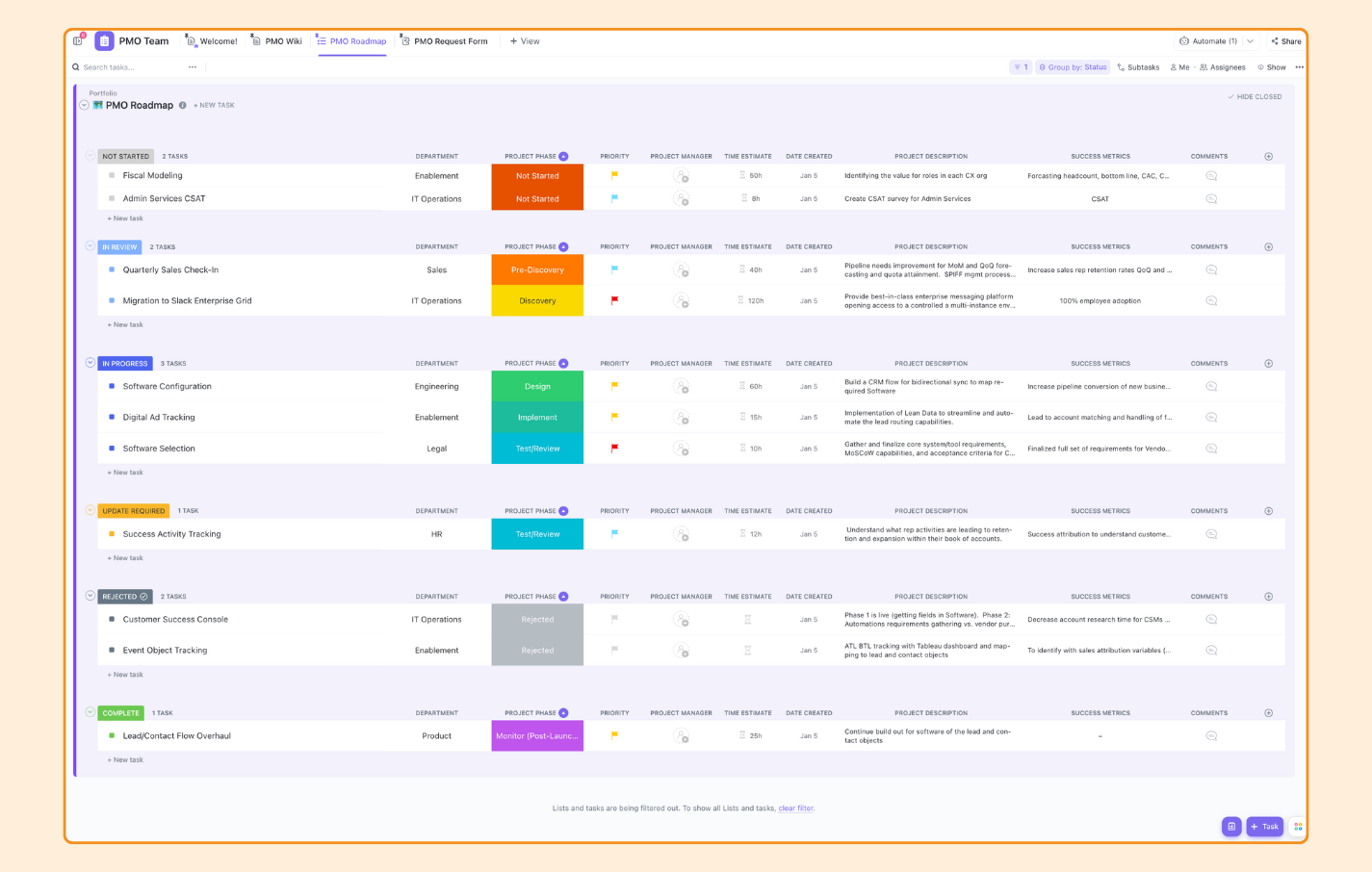
ClickUp and Monday.com are both versatile project management solutions, but they approach task organization and workflow management differently. ClickUp emphasizes flexibility, offering an extensive set of customizable features and views — from lists and boards to calendars and Gantt charts. It aims to be an all-in-one platform, blending task management, docs, goals, and chat features within a unified environment.
Conversely, Monday.com provides a highly visual and user-friendly interface, focusing on simplicity, clear visual workflows, and automation, appealing to organizations seeking intuitive project tracking and pipeline management.
In terms of core functionalities, ClickUp excels with its highly customizable task statuses, nested subtasks, and robust time-tracking capabilities. Its feature set allows teams to tailor workflows precisely to their processes, which can be empowering but sometimes overwhelming for new users. Monday.com, on the other hand, offers pre-built templates and straightforward automation, making it easier for teams to set up and start managing projects quickly.
While it might lack some of the deep customization options of ClickUp, its focus on clarity and ease of use can significantly reduce onboarding time, especially for less complex projects.
Pricing Showdown: Which Project Management Tool Offers the Best Value?
Pricing is a crucial factor for choosing between ClickUp vs Monday.com, especially considering the scale and budget constraints of your organization. Both platforms operate on tiered subscription models, with free plans available that include basic features but limited capabilities.
ClickUp’s free plan is remarkably generous, offering unlimited tasks and users, making it an attractive choice for small teams or startups testing the waters. Its paid plans tend to be competitively priced, with additional storage, advanced features, and more customization options.
Monday.com’s free tier is more limited, often oriented toward individual users or very small teams, with capabilities geared towards basic project tracking. Its paid plans are typically more expensive than ClickUp but include features like automation, integrations, and advanced reporting.
When evaluating value, it’s critical to consider not just initial costs but also potential productivity gains, scalability, and the features that a platform offers at each price point. For cost-conscious organizations seeking a flexible yet affordable option, ClickUp often provides better value, but larger enterprises might find Monday.com’s streamlined features worth the investment.
User Interface and Experience: ClickUp and Monday.com Head-to-Head
The user interface (UI) can significantly influence how quickly teams adopt and efficiently use a project management tool. ClickUp offers a feature-rich environment with a multitude of views—list, board, calendar, Gantt—allowing users to switch between different perspectives seamlessly. While this offers great flexibility, it can sometimes result in a steeper learning curve for new users. Advanced options and customizations are a plus for power users who want control, but beginners may find the interface initially overwhelming.
Monday.com prioritizes simplicity and visual clarity. Its clean, colorful dashboards and structured layouts make project statuses, timelines, and workflows immediately accessible and easy to understand. The platform’s drag-and-drop interface is intuitive, helping onboard new users quickly and reducing training time.
However, this minimalistic approach might limit advanced customization options for more complex workflows. Overall, if your team values an intuitive, visually appealing interface that ensures quick adoption, Monday.com tends to have the edge, whereas ClickUp caters more to users who seek deep customization and data control.
Automation Capabilities: Streamlining Workflows with ClickUp and Monday
Automation features can dramatically boost productivity by reducing manual repetitive tasks. ClickUp offers powerful automation across its features, including task status changes, notifications, and recurring tasks. Its automation builder is flexible, with a wide range of triggers and actions, enabling teams to craft tailored workflows that align precisely to their needs. This extensive customization requires a learning curve but rewards users with granular control, making it ideal for teams with complex processes.
Monday.com has invested heavily in automation, providing a user-friendly visual automation builder that allows users to create rules through simple if-this-then-that logic. While its automation options might not be as deeply customizable as ClickUp’s, they are straightforward and effective for automating routine workflows, reminders, and notifications.
If ease of setup is a priority, Monday.com’s automation capabilities are highly accessible. For teams that need complex, multi-step automations, ClickUp might be better suited, although it demands more initial configuration.
Integration Ecosystems: Expanding Functionality with Third-Party Apps
Extending platform capabilities through integrations is a key factor in modern project management tools. ClickUp offers a rich ecosystem with native integrations for popular apps like Slack, Google Drive, Zapier, and many others. Its open API allows for custom integrations as well, making it adaptable to diverse tech stacks. This extensive ecosystem means teams can sync their workflows with other tools and automate cross-platform tasks, creating a unified ecosystem that boosts productivity.
Monday.com maintains a broad array of integrations, including tools like Microsoft Teams, Zoom, Slack, and numerous CRM and marketing platforms. Its marketplace features various apps and widgets to enhance functionality, and it supports automation across these integrations as well.
While Monday.com provides a slightly more polished integration experience, especially with Microsoft products, ClickUp’s flexible APIs and broader range of integrations give it the edge for teams seeking deep, customizable, and extensive connectivity. The choice here depends on the existing tools in your stack and the level of integration customization needed.
Customization Options: Tailoring ClickUp and Monday to Your Team’s Needs
Customization plays a defining role in how well a project management platform adapts to specific team workflows. ClickUp excels in this area, offering users the ability to customize task statuses, views, fields, and even create custom dashboards. This level of flexibility means that teams can mold the platform to fit virtually any process, no matter how complex or unique. However, this power comes with increased complexity, which may require dedicated admin oversight and training.
Monday.com provides a more guided approach to customization through pre-designed templates and visual workflow builders. Users can modify boards, columns, and automations with ease, enabling teams to adapt quickly without getting lost in endless options.
While it might not match ClickUp’s depth of customization, its streamlined interface and preset templates facilitate quick setup aligned with common workflows. For teams prioritizing ease of setup while still needing some level of tailoring, Monday.com provides a pragmatic balance.
Reporting and Analytics: Tracking Progress and Measuring Performance
Effective project management hinges on robust reporting and analytics. ClickUp offers extensive reporting options, such as workload views, time tracking reports, goal progress, and custom dashboards. These tools empower managers to analyze team performance, identify bottlenecks, and make data-driven decisions. The customizable nature of ClickUp dashboards ensures insights are tailored specifically to your KPIs, although mastering these features may require some user training.
Monday.com’s reporting capabilities are centered around visual dashboards, chart views, and automation-triggered notifications. Its intuitive interface makes it easy to generate reports on project progress and team performance at a glance. While it provides sufficient insights for most teams, advanced analytics and customization options may not be as deep as those in ClickUp.
For organizations that value quick, visual insights and straightforward reporting, Monday.com delivers an excellent experience, whereas ClickUp caters to data enthusiasts seeking detailed and customizable analytics.
Collaboration and Communication: Fostering Teamwork in ClickUp and Monday
Strong collaboration features are fundamental to any effective project management platform. ClickUp integrates chat, comments, document sharing, and real-time updates within tasks, making it a comprehensive environment for team interaction.
Its comment system allows threaded conversations directly associated with tasks, which helps keep discussions organized and context-rich. The platform’s built-in Docs feature further enhances collaboration, reducing reliance on external tools.
Monday.com emphasizes visual collaboration, with features like comment sections, file sharing, and activity logs directly within boards. Its streamlined design encourages simple and efficient communication, especially for teams that prefer visual workflows over lengthy discussions.
While it might lack some of the depth seen in ClickUp’s integrated chat and docs, Monday.com simplifies collaborative processes, allowing teams to stay aligned without navigating through complex features. The choice depends on whether your team values a comprehensive communication suite (ClickUp) or prefers minimalistic, visual collaboration (Monday.com).
Use Case Scenarios: Determining the Ideal Fit for Different Industries
Different industries and team structures can significantly influence which platform fits best. ClickUp shines in environments requiring extensive customization, such as software development, product management, and creative agencies. Its powerful task hierarchies, custom fields, and integrated docs support complex workflows like bug tracking, design sprints, and content creation pipelines. Smaller teams or those experimenting with unique workflows can benefit from its flexibility without feeling constrained.
Monday.com appeals to teams that prioritize visual clarity and simple project pipelines, making it ideal for marketing, event planning, HR, and sales teams. Its easy-to-use templates facilitate quick deployment across various use cases, and its focus on automations helps streamline standard processes like onboarding, campaign management, and client communications.
For organizations seeking rapid setup and minimal learning curves, especially in less complex project types, Monday.com offers a highly effective solution, whereas ClickUp caters more to technically detailed or highly customized workflows.
ClickUp vs. Monday.com: Making the Right Choice for Your Project Management Needs
Choosing between ClickUp vs Monday.com depends heavily on your team’s size, workflow complexity, customization needs, and budget. If your organization requires an all-in-one platform capable of handling intricate workflows, extensive customization, and detailed analytics, ClickUp is likely the better fit.
Its flexibility makes it suitable for technical teams and agencies that demand control over every aspect of task management. Conversely, if your team values ease of use, rapid onboarding, and visual project tracking, Monday.com has the edge with its straightforward interface and intuitive automation.
Ultimately, the decision hinges on balancing depth versus simplicity and customization versus usability. Many organizations may find value in piloting both platforms through their free tiers to assess which aligns better with their workflow and culture. Both ClickUp and Monday.com have established themselves as leaders in the space, offering powerful features that can elevate project management to new levels when fitted to the right environment.
Relevant Reads:
Project Management Software in 2025: An In-Depth Exploration
AI-Powered Dashboards Top Benefits for Business Growth
Conclusion
In the clickup vs monday debate, each platform offers compelling features tailored to different organizational needs. ClickUp stands out for its extensive customization, robust integrations, and detailed analytics, making it well-suited for teams requiring complex workflows and advanced control. Monday.com excels with its visual, user-friendly interface, quick setup, and straightforward automation that appeal to teams prioritizing simplicity and ease of use.
Ultimately, the best choice depends on your specific project requirements, team size, and preferred user experience, but both tools continue to evolve, promising even more value in the future.