


AI Workflow Automation and Its Business Impact
- AI AI Workflow
- September 11, 2025
- No Comments
Is your team still juggling workflows manually while AI sits untapped? You’re not alone—and it’s costing time and insight. In this guide, we’ll break down AI workflow automation. I’ll show you where the real bottlenecks are, and walk through practical examples you can use today. Let’s get strategic.
What is AI workflow automation?
Imagine your business operations evolving from a rigid checklist into a smart, adaptive helper. That’s the essence of AI workflow automation: using AI agents to manage jobs that usually demand a human’s smarts, choices, and grasp of situations.
How AI workflow automation works
AI workflow automation fundamentally involves artificial intelligence acting much like a human, especially when making choices inside a set operation. Unlike simple “if-then” commands, AI agents delve into data, grasp the situation, and can even learn from prior experiences to guide their judgments.
For instance, Amazon optimizes ordering and logistics using AI vision and demand‑forecast models to automate fulfillment and reduce delays.
Software companies like ServiceNow, Salesforce, and SAP deploy AI agents to manage support tickets, invoices, and sales tasks—cutting case resolution time by 50 percent or more.
Picture an AI agent sifting through a customer’s question, picking up on their feelings, pulling up necessary details from different places, and then crafting a custom reply – all on its own.
Core capabilities of AI agents in workflow automation
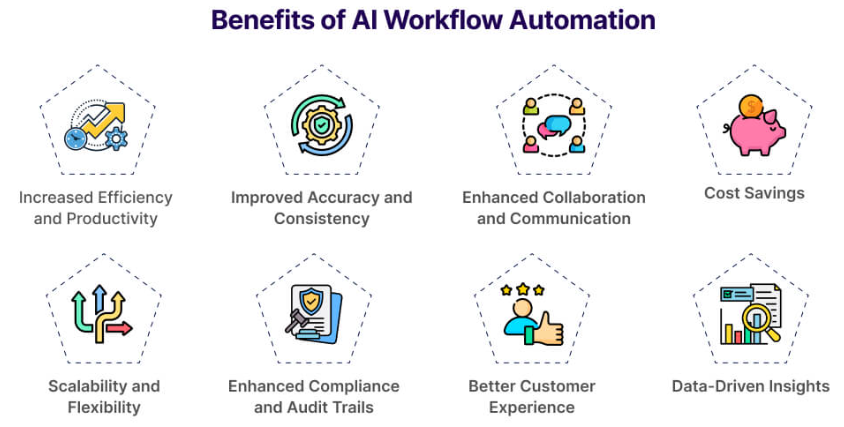
What makes these AI agents so powerful? It comes down to a few key capabilities:
- Contextual Understanding: They can grasp the meaning and nuances of information, not just keywords. This helps in smart handling of complicated information.
- Decision-Making: These AI tools look at various pieces of information, then decide what to do. Their actions are typically guided by our predefined instructions and also the behaviors they’ve absorbed from experience.
- Integration: AI agents easily connect with all sorts of systems and programs as we have seen, breaking down those pesky information silos.
The difference between rule-based and AI-powered workflows
Basic methods are straightforward yet restricted. But, AI-powered workflows introduce real intelligence. They manage unusual cases, adjust to new situations, and even pick up on fresh information. Forget the simple ‘if this, do that’ rule. An AI-powered workflow can grasp the situation, weigh its context, choose the best step from past data, and then act – even with options. It’s not a rigid robot; it’s a clever AI assistant for workflows that truly responds.
The benefits of AI-powered automation for business
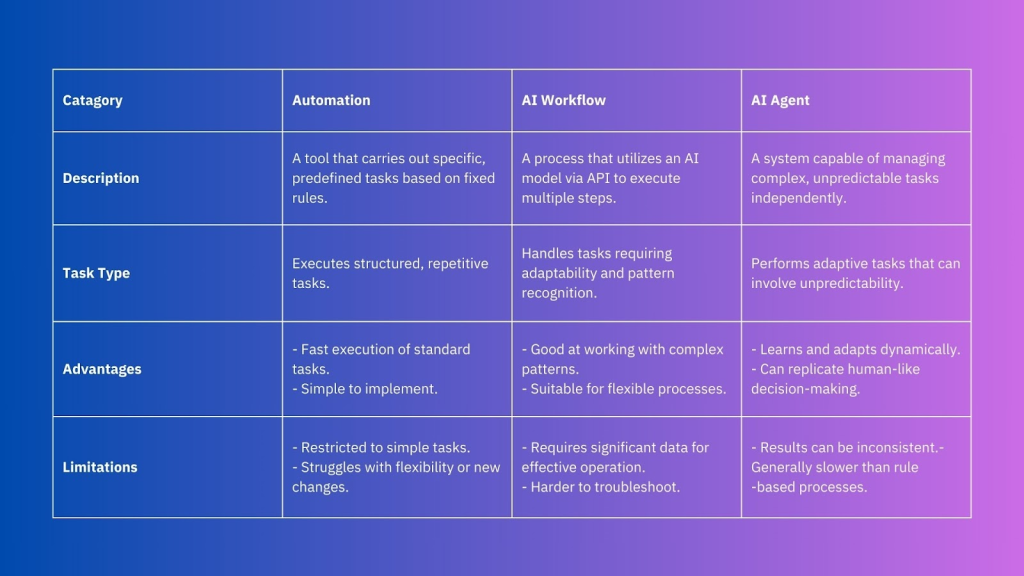
Your business needs to understand the move to AI workflow automation. Its benefits are transformative, affecting nearly all your daily tasks.
Improve operational efficiency
This lets your human teams concentrate on bigger-picture, inventive, and more fulfilling projects. Picture an end to manual data mistakes and endless hours spent making reports – just seamless, effective operations.
Enhance customer and employee support experiences
Think about it: AI agents for business offer round-the-clock, tailored help. Customers get their issues sorted faster, enjoy proactive tips, and leave feeling good. Meanwhile, your team gains quicker information access, effortless HR services, and smoother internal tasks, boosting their overall work happiness and output.
Reduce human error and decision fatigue
We all know people stumble. When tasks repeat endlessly, errors creep in. But AI agents are different; they don’t tire, lose focus, or get worn down by choices. This means far fewer mistakes and consistently better results in all automated work. This is truly business process automation with AI at its best.
Challenges of implementing AI workflow automation
The advantages are plain to see, but a grounded view of the process is equally vital. There are definitely obstacles when you bring AI workflow automation into play. It’s all about setting the right expectations and highlighting the good changes it brings to their daily tasks.
Integration and data silos
Your existing computer setups might clash with newer AI platforms. Lots of companies wrestle with information scattered across different teams and older computer programs. Breaking down these “data silos” is key, because AI agents need good, complete information to work well. Often, this means figuring out smart ways to connect everything and maybe updating your current tech.
Cost and resource planning
When you first bring AI typically into play, prepare for notable initial expenses covering software, necessary infrastructure, and finding the right talent. Crucially, consider the long-term benefits – the impressive ROI from better efficiency and a drop in errors.
Ethical, legal, and data privacy concerns
We also need some solid rules for data use and also to tackle potential biases in AI algorithms. This goes beyond just the tech; it’s about implementing solutions with care and security.
AI assistants: Powerful tools for workflow automation
So, the big question is, how do we get these AI agents busy? Often, they typically show up as AI assistants, each built to handle certain jobs within your daily tasks in general.
Different types of AI assistants (task-based, conversational, decision-making)
AI assistants aren’t just one-size-fits-all if you ask me. They come in various forms, each suited for different tasks:
Task-based assistants
These are designed for highly specific, often repetitive tasks. Think of them as super-efficient personal assistants for particular jobs – like an AI assistant for workflows that automatically categorizes incoming emails or processes expense reports.
Conversational assistants
These are your helpful digital assistants, built to talk with people using everyday language. They shine at handling customer questions, providing quick answers to common queries, and walking users through tasks step-by-step.
Decision-making assistants
These are the more advanced AI agents that analyze complex data and recommend or make decisions. Imagine an AI assistant for workflows that helps approve loan applications based on various financial indicators or suggests optimal marketing strategies.
How to integrate AI agents into existing business systems
Bringing in AI agents isn’t about tossing out your current systems. It’s about smart, targeted additions that boost impact where it counts most.
Step 1: Identify repetitive and rule-based processes
Start small. Think about processes that involve data extraction, basic classification, or routing information.
Step 2: Choose the right AI automation platform
Plenty of options stand ready, ranging from specific AI agents for business solutions to broad automation platforms that include AI functions (we’ll soon discuss n8n). Your decision should weigh factors like user-friendliness, how it links with existing systems, its capacity for growth, and the expense. For those wanting to enable their teams without deep technical skills, prioritize choices with minimal or no coding required. The AISurf offers robust solutions designed to integrate seamlessly.
Step 3: Monitor, refine, and optimize
Are their choices correct? Are there any slowdowns in the system? You’ll need to use what you learn from data and user comments to adjust how they work, perfect their AI workflow automation, and guarantee they consistently bring advantages. This continuous cycle of refinement is crucial for success that lasts.
How AI agents automate workflows: 3 practical business examples
Let’s bring this to life with some real-world scenarios where AI agents for business are making a tangible difference.
HR onboarding with AI assistants
Think about a new person starting at your company. Usually, that means a flood of emails, lots of paperwork, and someone manually updating various computer systems. It’s a real time sink.
- Automated document collection
- System provisioning
- Personalized welcome
AI in IT support ticket triage and resolution
IT support teams frequently drown in a deluge of incoming requests, which complicates efforts to prioritize and resolve problems swiftly. AI agents can revolutionize this:
- Intelligent triage
- Automated resolution
- Smart routing
Sales automation and CRM integration
Sales teams spend valuable time on administrative tasks instead of selling. AI agents can supercharge their efforts:
- Lead qualification
- CRM updates
- Personalized outreach
AI Agentic Workflows: Unlocking the next level of automation
We’ve talked about AI agents, but what happens when you chain them together in sophisticated ways? That’s where AI agentic workflows come in – the next frontier in intelligent automation. These are the advanced AI workflow tools that operations teams are increasingly adopting.
What is an AI agentic workflow?
An AI agentic workflow is a sequence of tasks where multiple AI agents collaborate, often dynamically, to achieve a complex goal. These are prime agentic workflow examples in action.
Traditional automation vs. AI-enhanced vs. AI-agentic workflows
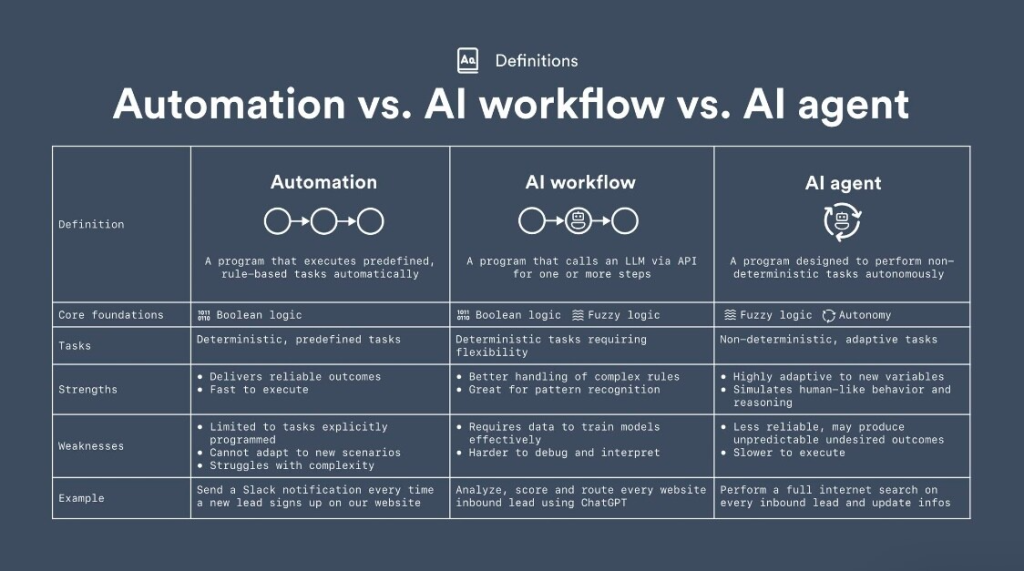
Let’s break down the evolution:
Traditional Automation
This is your basic “if-then” logic in general. Good for simple, repetitive tasks. (e.g., “If email comes in, move to folder X.”)
AI-Enhanced Automation
Here, AI is added to individual steps of a workflow. An AI might classify an email, but the overall flow is still largely fixed. (e.g., “AI classifies email, then move to folder X based on classification.”)
AI-Agentic Workflows
This is a whole new level. Multiple AI agents interact, each with a specific role, often with memory and the ability to adapt. These intelligent assistants can share details with one another, tackle tough choices, and even change how the work flows as they go. For instance, imagine one AI agent checking an email, then passing that information to a second AI agent to dig up related facts. A third AI agent might then write a reply, and a fourth would check it before sending in general. These are truly effective AI workflow tools.
Most impactful agentic workflow patterns (chained, gated, single/multi-agent)
These are some common ways to structure agentic workflows:
Chained Agents
One agent completes a task and also passes the output to the next agent. This results in creating a linear, yet intelligent flow.
- Characteristics: Sequential execution, output of one agent is input for the next.
- Benefits: Clear progression, good for multi-step processes where each step builds on the last.
- Ideal Use Cases: Content creation (research -> draft -> edit), complex data processing pipelines. These are great agentic workflow examples.
Gated Agents
An agent acts as a gatekeeper, deciding whether to proceed based on certain conditions or approvals.
- Characteristics: Conditional progression, decision-making agent controls flow.
- Benefits: Ensures quality control, compliance, or human oversight at critical junctures.
- Ideal Use Cases: Financial approvals, legal document review, high-stakes decision-making. More agentic workflow examples.
Single/Multi-Agent Workflows:
Single Agent
One powerful AI agent handles the entire process, often leveraging various tools and internal knowledge.
- Characteristics: Centralized intelligence, broad capability.
- Benefits: Simpler to manage for certain complex tasks, less overhead.
- Ideal Use Cases: Customer service bots handling end-to-end inquiries, comprehensive market research.
Multi-Agent
A team of focused AI agents typically works together, with each one handling a specific piece of the larger job. Their varied skills contribute to the overall task.
- Characteristics: Distributed intelligence, parallel processing, dynamic interaction.
- Benefits: Highly efficient for complex, multifaceted problems, leverages specialized knowledge.
- Ideal Use Cases: Strategic planning, complex data analysis, highly nuanced problem-solving.
How to build an AI agentic workflow using n8n
Ready to get your hands dirty?
Step 1: Trigger workflows via Telegram or form input
Your workflow needs a starting point. This could be a new message on Telegram, a submitted form on your website, or even an email. This is your “trigger” node in n8n.
Step 2: Use AI agent to process user input
Once activated, link your starting point to an AI agent component (like one from OpenAI). This AI agent will then receive whatever the user provides – say, a prompt for a blog post on a particular subject – and work on it. It could pull out important keywords, grasp what the user means, or even brainstorm initial concepts.
Step 3: Add memory for contextual continuity
For a truly intelligent agentic workflow, you need memory. Add a node that allows your AI agent to “remember” previous interactions or contextual information. This ensures continuity and more coherent responses as the workflow progresses.
Step 4: Connect external APIs like DALL·E or OpenAI
Now, connect your AI agent to other powerful APIs. For our content creation example, after the initial topic is understood, you might:
Connect to another OpenAI node to generate blog post drafts based on the context.
Connect to DALL·E to create relevant images for the blog post.
Step 5: Deliver responses and visuals in real time
After the AI agents finish their tasks (like creating text or images), link up the steps to send out the results. You might email the draft, publish it to a content system, or ping the user on Telegram with what was made.
Step 6: Test and iterate
Crucially, test everything! AI agentic workflows are highly iterative. What AI workflow tools are you already using? This allows you to learn, demonstrate success, and build internal confidence. This is a practical approach to business process automation with AI.
Conclusion / Bottom Line
Forget futuristic talk about AI workflow automation; it’s a present-day necessity for businesses striving to lead. Through AI agents, operations gain more than just efficiency – they gain intelligence, memory, and a deep understanding of context. The AISurf is here to guide you every step of the way in leveraging these powerful advancements.
Check out more blogs on The AI Surf website:
- Al Flow
- 12 Best AI Coding Tools for Developers in 2024
- The Secret Sauce: How AI Prompt Datasets Can Transform your AI Projects
FAQs
What is AI workflow automation and how does it work?
Imagine bringing true intelligence to your everyday business tasks. It truly delivers on its promise. It employs clever AI agents to manage tasks that typically call for human intellect, swift judgment, and a comprehensive view of the situation.
How do AI agents differ from traditional automation tools?
Think of traditional automation (like RPA) as following a strict recipe. It’s typically great for repetitive jobs where every step is spelled out. But AI agents are different. They’re smart enough to grasp the full picture, adapt based on fresh information, and handle unexpected twists.
Can small businesses use AI automation tools?
Absolutely! Starting with specific, high-impact workflows can yield significant benefits even for smaller operations.
What are the challenges of implementing AI agents in workflows?
Key challenges include overcoming organizational resistance to change, integrating AI agents with existing, often siloed, data systems, managing the initial costs and resource planning, and addressing critical ethical, legal, and data privacy concerns related to AI deployment.
How do I build an AI agentic workflow with no-code tools like n8n?
Building an AI agentic workflow with no-code tools like n8n typically involves:
- Triggering the workflow: Setting up a starting point (e.g., form submission, email, message).
- Processing input with AI: Using an AI agent node (like an OpenAI integration) to understand and process the initial input.
- Adding memory (optional but recommended): Incorporating nodes to maintain contextual continuity across steps.
- Connecting external APIs: Integrating other AI services (e.g., DALL·E for images) or business systems.
- Delivering output: Sending the results to the desired destination.
- Testing and iterating: Continuously refining the workflow for optimal performance.