



Asana or Trello: Choose the Right Tool for Your Team
- ClickUp
- October 22, 2025
- No Comments
When it comes to managing projects efficiently, choosing the right tool can make all the difference. Whether you’re a small team or a large enterprise, the debate of Asana or Trello often comes to the forefront, as these two platforms dominate the task management landscape.
Both Task tracking software platforms have their strengths and unique features, making it essential for teams to deeply understand their differences to select the best fit. In this article, we will explore the depths of Asana vs Trello to help you determine which project management tool aligns with your team’s needs and workflow.
Asana vs. Trello: A Comprehensive Comparison for Project Management

Asana vs Trello presents a fascinating case of two popular project management tools with contrasting approaches. Asana offers a more structured work environment, designed to handle complex workflows, deadlines, and dependencies. It provides a multitude of features geared towards larger teams that need detailed task tracking and comprehensive reporting. Trello, on the other hand, embraces simplicity with its visual Kanban-style boards, making it a favorite for smaller teams or projects that require quick setup and flexible task organization.
Leveraging Asana vs Trello means understanding not just their functionalities but also how they complement different team dynamics. Asana’s workflow automation, timelines, and workload management are designed to support project tracking at scale, whereas Trello’s intuitive card-based interface fosters rapid collaboration and adaptability. Your choice hinges on whether you need detailed task management and automation or prefer a simple, visual approach to project progress.
Key Differences Between Asana and Trello: Which Platform is Right for You?
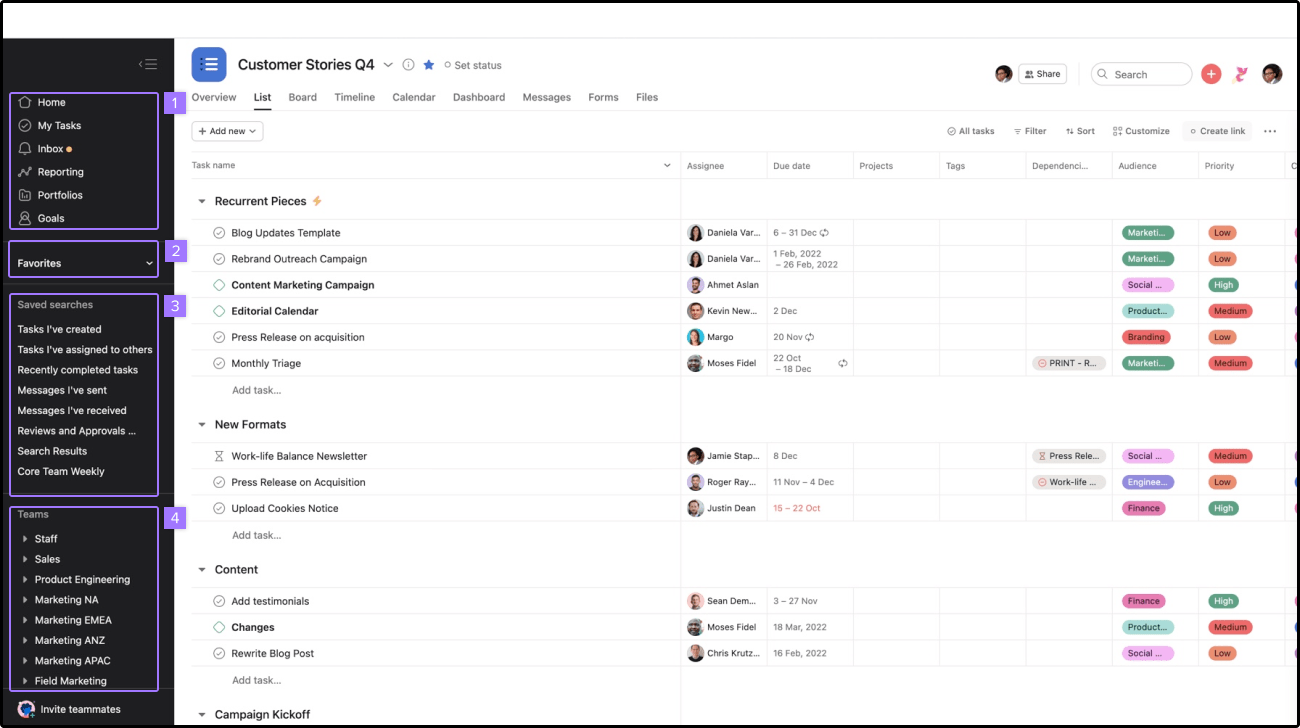
The core differences between Asana or Trello lie in their architecture and suitability for various project types. Asana is built around complex task dependencies, milestones, and project timelines, making it suitable for projects requiring precise deadlines and multi-faceted workflows. Trello operates on a more straightforward Kanban board system, excelling in managing ongoing tasks, personal productivity, and light collaboration. For teams that prioritize customization and flexibility without a steep learning curve, Trello often feels more approachable.
From a strategic perspective, choosing the right platform depends heavily on your team’s size, project complexity, and preferred workflow. If your team needs robust automation, detailed reporting, and task hierarchy, Asana vs Trello reveals that Asana often wins in those areas. Conversely, if simplicity, visual task tracking, and rapid onboarding are more critical, Trello provides an effective and user-friendly solution. Evaluating these differences will help stakeholders align project management tools with their long-term productivity goals.
Asana and Trello: Features, Pricing, and User Interface Compared
When comparing Asana vs Trello, it’s impossible to ignore their distinctive feature sets. Asana offers task assignments, due dates, project templates, advanced search, and automation capabilities, all displayed within a comprehensive workspace. Its interface emphasizes task hierarchy and detailed project overviews, catering to teams with structured workflows. Trello’s simplicity shines through its drag-and-drop cards, customizable boards, power-ups, and a clean, minimalistic interface that prioritizes visual clarity.
Pricing plays a significant role in decision-making. Asana provides a free tier with basic features, but for advanced capabilities like timeline view or workload management, premium plans are necessary. Trello’s free plan covers most essential features, with optional power-ups and integrations available via paid plans. The user interface reflects their core philosophies: Asana’s more detailed, task-oriented layout contrasts with Trello’s straightforward, card-centric design that’s easy for new users to adapt to immediately.
Project Management Software Showdown: Asana Versus Trello
The Asana vs Trello showdown is effectively a contest of complexity versus simplicity. Asana’s sophisticated project tracking and automation tools position it as a robust platform for multi-phase projects, cross-team collaboration, and performance analysis. Trello’s casual, flexible approach simplifies project visualization through boards, making it highly accessible for teams that prefer a hands-on, visual method. This fundamental contrast underscores their targeted audiences—Asana for detailed project planning, Trello for quick, visual task management.
In wider context, Asana’s capability to handle complex dependencies and integrations highlight its suitability for enterprise environments, while Trello’s open-ended, flexible structure attracts startups and small teams. Recognizing these nuanced differences enables organizations to align their project management strategy accordingly, acknowledging that Asana vs Trello are not just competitor platforms but cater to distinct work cultures and project scopes.
Asana or Trello: Choosing the Best Tool for Your Team’s Workflow
Choosing between Asana vs Trello hinges on understanding your team’s workflow needs and project scope. If your project involves multiple phases, task dependencies, deadlines, and requires detailed reporting, Asana’s comprehensive features provide the necessary support. Its ability to handle complex workflows makes it an invaluable asset for teams that need structure and accountability. Conversely, Trello shines in scenarios where rapid task deployment, flexible collaboration, and visual clarity are paramount.
To make an informed decision, consider your team’s size, project complexity, and preferred work style. While Asana can scale into a sophisticated project management hub, Trello’s intuitive design allows for quick adaptation and minimal onboarding. Ultimately, Asana vs Trello responses should align with whether stability and depth or flexibility and simplicity are your priorities in team collaboration.
Trello and Asana: A Detailed Look at Functionality and Scalability
When evaluating Trello and Asana, it’s critical to assess their scalability. Trello, with its straightforward card and board system, is ideal for small to medium teams, project sprints, and even personal task management. As the organization’s needs grow, though, Trello’s lack of advanced automation and detailed reporting may become limiting. Meanwhile, Asana’s feature set is designed to grow with your team, supporting complex workflows, multiple projects, and integration with third-party tools.
Functionality varies distinctly between the two: Trello allows for a highly customizable, visual experience suitable for iterative or agile projects, while Asana offers extensive task relations, dependencies, and automation to streamline larger, interconnected campaigns. The scalability factor becomes a fundamental consideration for teams planning long-term growth, as Asana vs Trello reveals that each tool is optimized for different stages of organizational development.
Comparing Asana’s Advanced Features to Trello’s Simplicity
One of the most striking distinctions in Asana vs Trello is that Asana provides advanced project management features such as timeline views, workload balancing, and custom fields, which are essential for managing intricate workflows. These capabilities make Asana suitable for projects requiring detailed task dependencies and resource allocation. Trello, meanwhile, emphasizes simplicity with its kanban boards, which are easy to set up and modify but lack the depth of automation and analytics that Asana offers.
However, Trello’s simplicity also translates into its ease of use, making it ideal for teams that need to start working immediately without a steep learning curve. Asana vs Trello demonstrates a clear trade-off: Asana excels in complex, large-scale project management, while Trello shines in providing a quick, visual overview with minimal setup. The decision rests on whether your team prioritizes depth and control or flexibility and ease of use.
Asana vs. Trello: Which Project Management Tool Integrates Best with Your Ecosystem?
Integration capability is vital in a modern digital workspace. Asana vs Trello reveals that Asana offers robust integrations with tools like Slack, Google Drive, Microsoft Teams, Zapier, and many others, often with automation to streamline workflows. Its extensive API support makes it a versatile hub for connecting with other business systems. Trello also supports many integrations, known as Power-Ups, which can extend its functionality but are sometimes limited in free plans.
Choosing the better fit depends on your current ecosystem. If your team relies heavily on tools from Microsoft or Google, Asana’s native integrations could offer smoother workflows. If your team favors a certain project or communication platform, Trello’s flexible Power-Ups might suffice. Ultimately, Asana vs Trello invites consideration of the ClickUp ecosystem seamlessness that can influence productivity significantly.
Trello vs. Asana: User Reviews and Real-World Performance Analysis
User reviews and performance analyses paint a comprehensive picture of how these tools function in real-world scenarios. Many users praise Trello for its simplicity, visual clarity, and ease of onboarding, particularly for small teams or quick projects. However, some note that its capabilities can be limited when tackling complex workflows or large-scale projects. Conversely, Asana is highly rated for its powerful features, automation, and ability to handle multiple interconnected tasks, but some users find its interface overwhelming or too feature-rich for simple projects.
Performance-wise, Trello tends to excel in scenario where flexibility and speed are critical, while Asana’s strengths lie in managing complex, multi-layered projects with detailed accountability. These insights stress that Asana vs Trello aren’t just theoretical choices but practical tools that directly impact project success and team satisfaction.
Making the Right Choice: A Definitive Guide to Asana and Trello for Project Management
Selecting between Asana vs Trello ultimately depends on your unique project requirements, team size, and preferred workflow style. If your organization needs a highly detailed, scalable project management solution with automation and reporting, Asana offers a compelling suite of features that can support growth. Conversely, if your team values ease of use, rapid setup, and visual task tracking, Trello provides a straightforward and engaging experience. Combining these insights allows decision-makers to tailor their choice to match their strategic goals and operational style.
In conclusion, both Asana vs Trello are industry-leading tools, each excelling in different areas of project management; understanding their core differences and aligning them with your team’s needs ensures your projects stay on track and your team remains productive.
Relevant Reads:
Best ClickUp Alternatives for 2026: Top Productivity Tools
Project Management Software in 2025: An In-Depth Exploration
Conclusion
In the ongoing debate of Asana vs Trello, it is clear that each platform offers distinct advantages tailored to different team needs and project complexities. Asana excels in facilitating complex workflows, tracking progress through detailed reporting, and integrating with a broad ecosystem of business tools, making it an ideal choice for larger teams or projects needing rigorous management. Trello, on the other hand, thrives in environments demanding visual clarity, rapid task deployment, and minimal learning curve, perfect for smaller teams or projects that prioritize flexibility and simplicity.
Ultimately, selecting the right project management platform hinges on understanding your team’s size, workflow complexity, and preferred style of collaboration, ensuring that your choice enhances productivity and project success in the long run.