


Best LinkedIn Content Formats: What the Data Says
- September 25, 2025
- No Comments
Stop guessing what to post on LinkedIn. I’ve been there—spending hours polishing a clever hot take, only for it to die in the feed with 12 likes and a pity comment from my best friend. Meanwhile, someone else throws up a half-baked carousel and racks up thousands of impressions.
So, I stopped guessing and started analyzing. After reviewing 815 LinkedIn posts, I found a clear pattern: format matters as much as the idea itself. Even the best insight will flop in the wrong wrapper.
Here’s what actually works—and what doesn’t.
Credit: Linkedin User
What LinkedIn Content Format Works Best?
Document posts (carousels) consistently deliver the highest reach and engagement on LinkedIn.
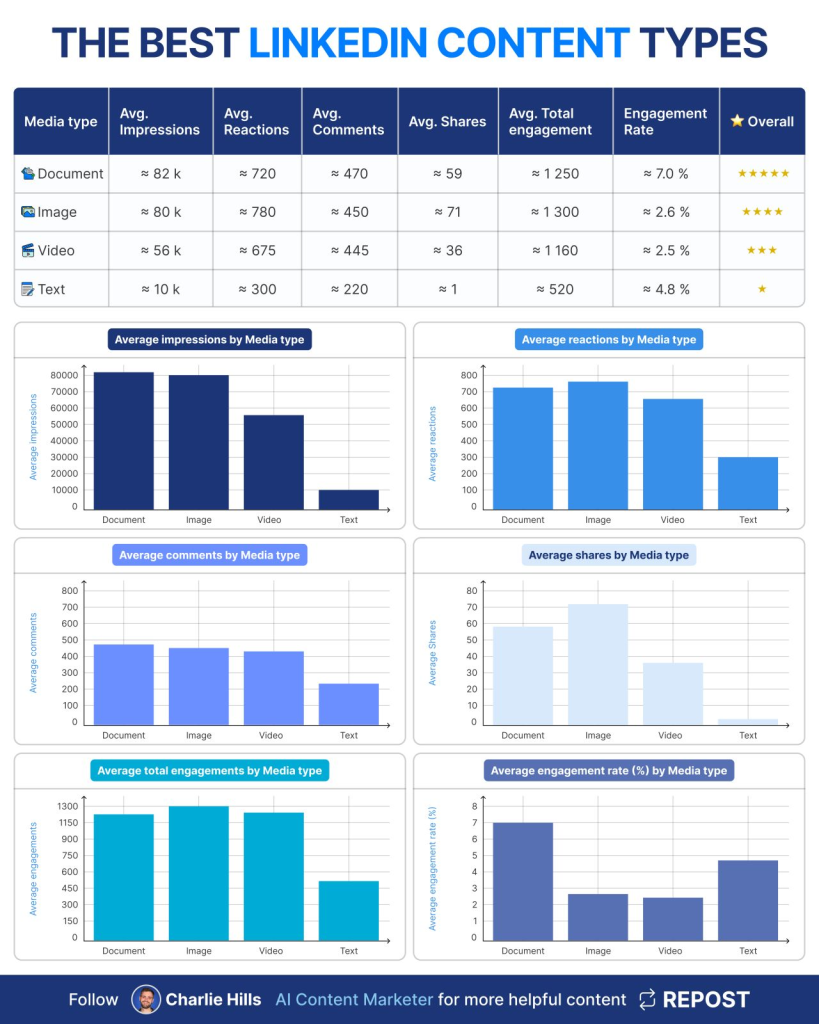
In my analysis of 815 posts, carousels averaged 82k impressions and a 7% engagement rate, far outperforming images, videos, and text-only posts. If you’re not sure which format to test first, start with carousels.
LinkedIn Content Formats Ranked (Data-Backed)
1. Document Posts (Carousels)
Think of these as mini slide decks you swipe through. Perfect for:
- Workflows
- Step-by-step guides
- Visual storytelling
Performance (from my dataset):
- 59 shares
- 720 reactions
- 470 comments
- 82,000 impressions
- 1,250 total engagements
- Engagement rate: 7.0%
Why they work: People stick around. Carousels encourage dwell time, which LinkedIn’s algorithm loves. They also feel like bite-sized value drops, making them super shareable.
Watch out for: Keeping attention beyond slide 3. Most users swipe quickly, so front-load your best insights.
2. Image Posts (Cheatsheets)
These are the visual one-pagers—think infographics or neatly designed cheat sheets.
Performance:
- 71 shares
- 780 reactions
- 450 comments
- 80,000 impressions
- 1,300 total engagements
- Engagement rate: 2.6%
Why they work: Highly shareable and saveable. People love a clean cheat sheet they can stash away for later.
Watch out for: They’re time-intensive to design, and once you post it, the lifespan is shorter than a carousel.
3. Video Posts
Show your face. Build trust. Explain quickly.
Performance:
- 36 shares
- 675 reactions
- 445 comments
- 56,000 impressions
- 1,160 engagements
- Engagement rate: 2.5%
Why they work: Videos humanize you. Great for thought leadership, quick workflow demos, or short tips.
Watch out for: Production time. Also, LinkedIn viewers often scroll without sound—subtitles are non-negotiable.
Text-Only Posts
The OG format. Quick rants, spicy hot takes, or mini-stories.
Performance:
- 1 share
- 300 reactions
- 220 comments
- 10,000 impressions
- 520 engagements
- Engagement rate: 4.8%
Why they work: Easy to publish, great for storytelling, and good at sparking debates.
Watch out for: Reach is capped. Without strong copy or a polarizing angle, text posts disappear fast.
Relevant Reads:
The Ultimate LinkedIn Content System That Turns Posts Into Clients
How to Master LinkedIn in 2025: My Exact Framework
So, Which Format Should You Use?
Here’s the truth: your audience might behave differently. My dataset shows carousels dominate, but that doesn’t mean you should ignore images, videos, or text.
The smart play:
- Start with carousels (high probability of traction).
- Layer in images/videos for variety.
- Test text posts when you’ve got a spicy opinion.
- Measure ruthlessly—don’t trust your gut, trust the data.
Conclusion
LinkedIn isn’t just about what you say—it’s about how you package it.
From my analysis of 815 posts:
- Carousels reign supreme (highest reach + engagement).
- Images drive shares (great for cheat sheets).
- Videos build trust (show your face).
- Text works for stories/hot takes (but reach is limited).
The bottom line? Don’t guess—test. But if you’re starting fresh and want results fast? Go with carousels. The data doesn’t lie.
Explore more AI tools, strategies, and insights on TheAISurf.
FAQs
Q1. Why do LinkedIn carousels perform so well?
Carousels boost dwell time—the more slides a user flips through, the more the algorithm rewards the post. They also package value in a digestible, shareable format.
Q2. Should I only post carousels on LinkedIn?
No. While carousels generally perform best, a healthy content mix (images, videos, text) keeps your feed fresh and appeals to different audience preferences.
Q3. What’s the average engagement rate on LinkedIn posts?
According to my 2025 analysis, carousels averaged 7% engagement, while videos and images sat closer to 2–3%. Text posts can spike higher if the topic sparks debate.