



Notion vs Trello: Best Productivity App for You
- ClickUp
- October 22, 2025
- No Comments
When delving into the world of digital productivity tools, it becomes evident that notion vs trello is one of the most frequently debated comparisons among professionals, students, and project managers alike. Both platforms have established themselves as leaders in organizational tools, yet they cater to different user needs, workflows, and preferences.
Understanding the nuanced differences between Notion and Trello is paramount for anyone looking to streamline their work processes or personal projects efficiently. This comprehensive guide aims to clarify those distinctions, helping users select the tool that aligns best with their specific needs through an in-depth analysis of features, flexibility, and usability.
In this article, we’ll explore Collaboration tools for remote teams, providing insights into when each platform excels, its limitations, and how their ecosystems differ. Whether you’re a solo entrepreneur, part of a large team, or just someone interested in personal productivity, this resource will serve as a detailed manual to make an informed decision.
From project management capabilities to customization options, this comparison aims to go beyond surface-level features, offering real-world context and practical scenarios that illuminate the strengths and weaknesses of each platform.
Notion vs. Trello: A Comprehensive Comparison for Productivity Management
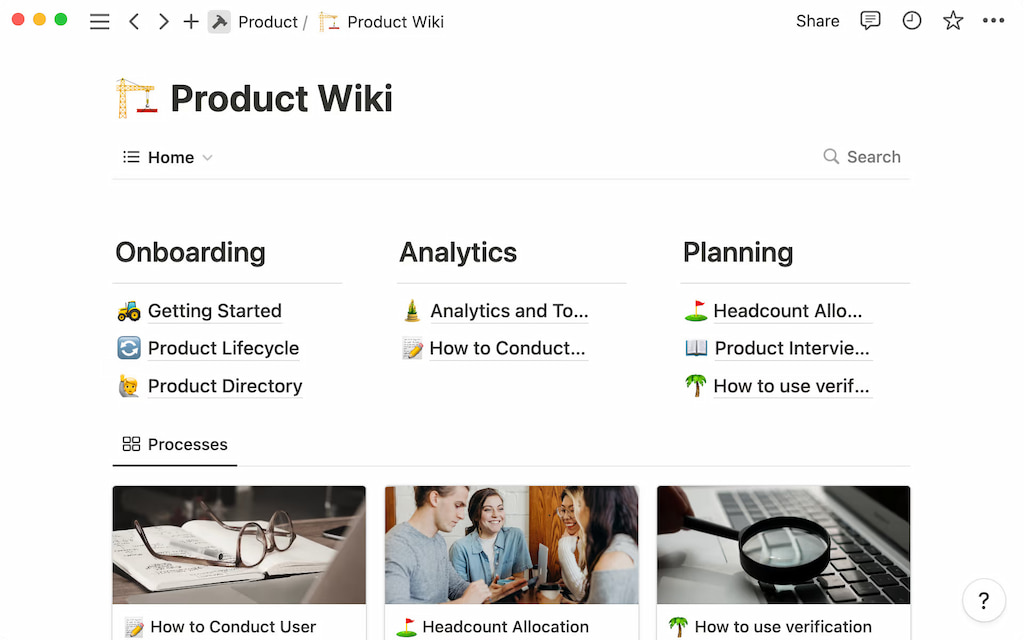
When evaluating notion vs trello, it’s essential to consider their core philosophies. Trello operates on a simple, visual kanban board system designed primarily for task and project management. Its intuitive drag-and-drop interface facilitates quick updates and workflows, making it ideal for teams and individuals who prefer a straightforward, visual approach. Notion, on the other hand, positions itself as an all-in-one workspace, blending note-taking, databases, calendars, and task management into a flexible platform. Its versatility allows for deep customization, transforming it into a personal knowledge base, project tracker, or even a documentation hub.
The fundamental difference between the two platforms lies in their scope and depth. Trello champions simplicity and ease of use, which minimizes the learning curve and accelerates onboarding. Conversely, Notion offers a robust set of features that, while powerful, can introduce complexity, especially for new users.
The decision between notion vs trello often hinges on the user’s need for flexibility versus straightforward task tracking. The choice ultimately impacts productivity workflows, team collaboration, and how information is stored and retrieved, making this comparison vital for selecting the right tool.
Key Differences Between Notion and Trello: Features, Flexibility, and Pricing
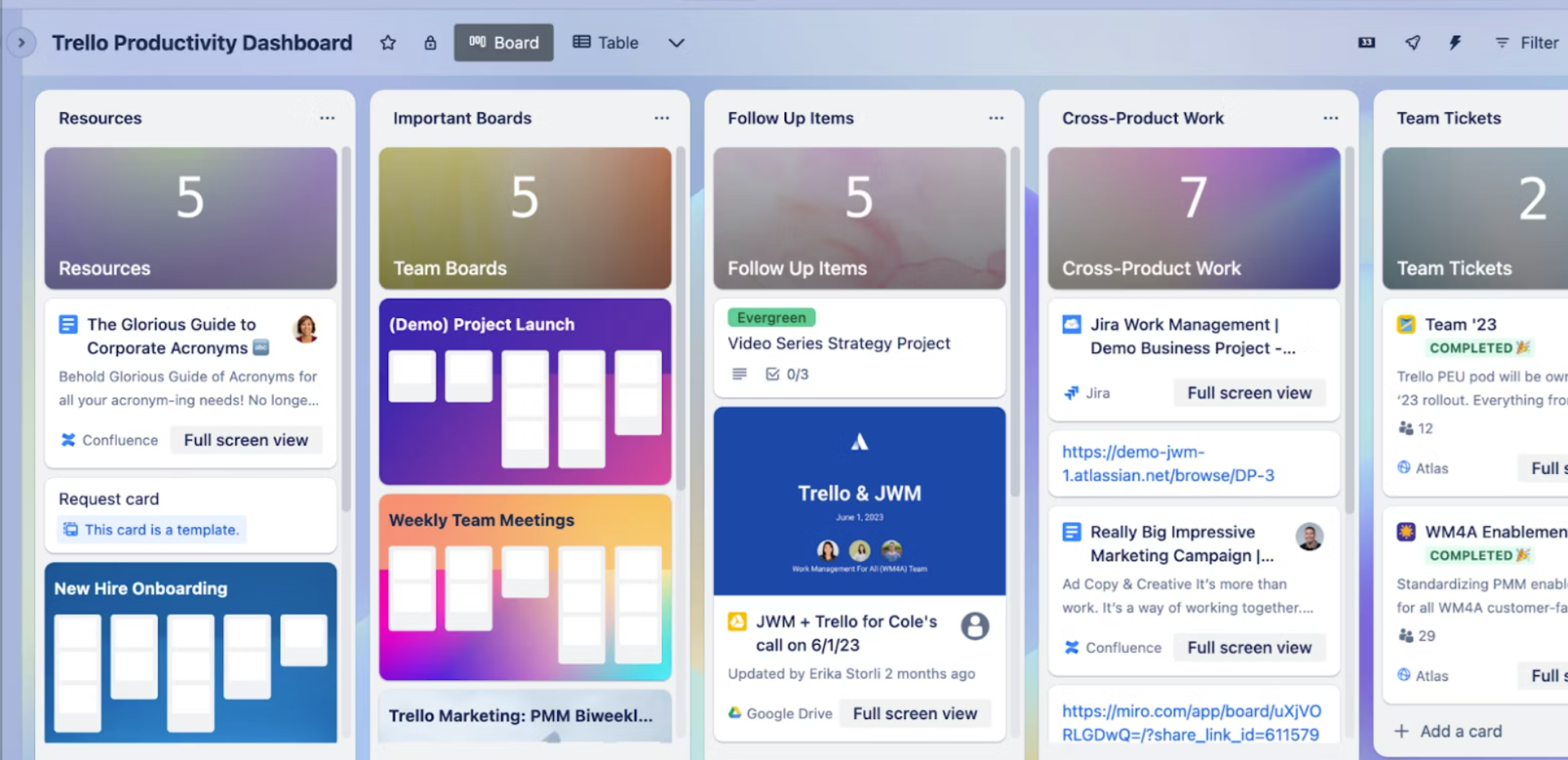
Notion and Trello differ significantly in their core functionalities. Trello’s defining feature is its kanban-style boards, cards, and lists, which promote a highly visual workflow management system. Users can add comments, attachments, checklists, and labels within cards, but overall, Trello constrains itself to a task-oriented approach. Notion’s feature set extends far beyond, providing customizable pages, embedded databases, calendars, and rich media support, thus creating a flexible environment that adapts to different workflows beyond simple task management.
Pricing is another crucial factor. Trello offers a free tier that includes unlimited personal boards and limited team features, making it accessible for small teams or individual users. Premium features like automation, larger attachment limits, and advanced integrations are part of paid plans. Notion, however, also provides a free plan suitable for personal use, but its paid subscriptions unlock collaborative tools, increased storage, and admin controls suited for larger teams. While Trello emphasizes a straightforward pricing model, Notion’s flexible plans cater to both individual productivity enthusiasts and enterprise-level organizations, making it adaptable but potentially more complex to navigate when deciding the best fit.
When to Choose Notion Over Trello: Ideal Use Cases and Scenarios
Opting for notion vs trello hinges on understanding the strengths that each platform offers for specific scenarios. Notion shines when users require a centralized knowledge base combined with project tracking. For example, content creators, researchers, or academic teams benefit from Notion’s ability to integrate documents, notes, and databases all within one environment. Its hierarchical structure and rich media support make it ideal for maintaining organized references alongside ongoing projects.
Furthermore, complex workflows that demand automation, custom templates, and data management are better served by Notion. Small to medium-sized teams that need to collaborate on multifaceted projects—covering research, documentation, and task delegation—will find Notion’s flexibility invaluable. Its ability to create interconnected pages allows teams to develop bespoke systems for tracking goals, managing client contacts, or storing product specifications. These characteristics make Notion an excellent choice for users who need more than just task management and prefer a comprehensive, integrated workspace.
When to Choose Trello Over Notion: Ideal Use Cases and Scenarios
While Notion provides a multi-dimensional workspace, Trello’s simplicity makes it the tool of choice for straightforward project management and task tracking. Teams that need quick, visual updates and a transparent workflow tend to prefer Trello’s interface. Its drag-and-drop nature enables rapid iteration of workflows, making it perfect for Agile teams using Scrum or Kanban methodologies. For instance, task boards for software development, editorial workflows, or event planning are often set up in Trello for their clarity and ease of use.
In scenarios where team members are less concerned with detailed documentation and more focused on task execution, Trello excels. Its integrations with tools like Slack, Jira, and automation features streamline routines without overwhelming users with complex customization. For organizations that prioritize speed, simplicity, and real-time collaboration over extensive data management, Trello’s lightweight design reduces friction, helping teams stay agile and responsive to dynamic project requirements.
A Deep Dive into Notion’s Database Capabilities vs. Trello’s Board-Centric Approach
One of the most significant distinctions in the notion vs trello debate is Notion’s advanced database functionalities. Notion enables users to create relational databases that can handle structured data, such as project trackers, CRM systems, or inventory lists. These databases can be viewed in multiple formats—tables, kanban boards, calendars, or gallery views—providing flexibility in data visualization and interaction. The ability to link databases and embed custom filters set Notion apart as a powerhouse for data-driven workflows.
Trello, by contrast, remains primarily coalesced around its board-centric model. While it has introduced features like custom fields and automation (via Butler), it does not inherently support relational databases or complex data manipulations. Its strength lies in visual task management rather than comprehensive data management. For users needing detailed data relationships, filtering, or multiple views for large datasets, Notion’s database capabilities are more aligned with enterprise or project-heavy workflows. Trello excels in simple, visual task boards but becomes limiting when complex data relationships are required.
Collaboration and Team Management: Comparing Notion and Trello’s Features
Collaboration is at the core of both notion vs trello, and each platform approaches it differently. Trello simplifies team collaboration with open boards, comments, mentions, and activity feeds, enabling teams to stay updated on task progress in a visual manner. Its seamless integrations and automation features facilitate communication but are often limited to task-focused interactions. Trello’s real-time updates and notifications foster an agile environment, especially when managing short-term projects or sprints.
Notion offers a more comprehensive set of collaboration tools that encompass document sharing, comments, mentioning colleagues, and permission controls at the page level. It allows teams to co-author notes, compile meeting minutes, or collaborate on complex project documentation simultaneously. Its granular permission controls make it suitable for medium to large teams that need coordinated access across different projects or departments. For teams prioritizing embedded documentation and knowledge sharing alongside task management, Notion’s collaboration features provide a more integrated experience.
Customization and Integrations: Exploring the Ecosystems of Notion and Trello
Customization is a major differentiator in notion vs trello, especially for users seeking tailored workflows. Trello’s customization relies heavily on its power-ups and integrations with numerous third-party applications like Slack, Google Drive, and Jira. Its automation tool—Butler—enables users to create rules, buttons, and scheduled commands to streamline repetitive tasks. These features make Trello highly adaptable for various workflows, though often at the expense of added complexity.
Notion’s ecosystem is built around flexible page templates, embedded media, and modular components. Users can create customized dashboards, project trackers, or personal knowledge bases entirely suited to their needs. Its extensive API also allows for integration with popular tools, syncing data across platforms and automating workflows. Notion’s ecosystem encourages building bespoke solutions within its environment, which can be both empowering and overwhelming. Both platforms provide extensive options, but Trello’s ecosystem leans more on external integrations, while Notion promotes internal customization.
Notion vs. Trello for Project Management: A Practical Guide
Effective project management in notion vs trello depends on the complexity and scope of projects. Trello is ideal for managing short-term projects with well-defined steps, where a visual kanban view helps teams track progress at a glance. Its simplicity means projects can be set up quickly, and team members can easily see task statuses in real time. For teams practicing Agile or Scrum methodologies, Trello’s boards provide a clear, actionable workspace that requires minimal setup and learning time.
In contrast, Notion offers a richer environment suited for multi-phase projects with a need for extensive documentation, task interdependencies, and resource tracking. Its ability to create custom databases, timelines, and linked pages makes it perfect for managing complex projects that involve numerous stakeholders, detailed planning, and ongoing collaboration. When choosing notion vs trello for project management, consider whether your workflow benefits from simplicity and speed or requires-depth organization and data management.
User Interface and User Experience: A Head-to-Head Comparison of Notion and Trello
The interfaces of Notion and Trello reflect their philosophical differences. Trello’s minimalist, card-based layout is highly intuitive, particularly for newcomers who appreciate visual cues and straightforward navigation. Its drag-and-drop functionality and clear layout help reduce the cognitive load, enabling quick adoption. However, Trello’s interface can become cluttered or limited when handling extensive data or nested workflows, which can impact long-term usability.
Notion’s interface is more complex, with a flexible, modular workspace that can be customized extensively. Its design caters to users who enjoy building their environment and require access to multiple types of content in one place. While this flexibility offers power, it also involves a learning curve and initial ClickUp setup effort. Users who prefer a clean, visual, and straightforward interface might find Notion’s myriad options overwhelming initially, but those who value customization and deep data integration will likely find it worth the investment.
Making the Right Choice: Notion or Trello for Your Specific Needs
Choosing between notion vs trello ultimately rests on individual needs, workflows, and organizational goals. If you require a simple, visual project management tool that can be quickly adopted and used by small teams or individuals, Trello’s straightforward approach makes it an excellent choice. For those needing a versatile workspace that combines notes, databases, and collaborative documentation within a single platform, Notion offers unmatched flexibility.
While Trello excels with its ease of use, minimal setup, and real-time collaboration, Notion provides comprehensive customization and integration capabilities that support complex workflows. Consider the level of data management, automation, and documentation your projects demand, and weigh those needs against your team’s size and technical proficiency. The right choice depends on aligning your specific operational needs with these distinct strengths, ensuring productivity and efficiency.
Relevant Reads:
Project Management Software in 2025: An In-Depth Exploration
Monday vs Notion: Which Tool Boosts Your Productivity?
Conclusion
In the ongoing comparison of notion vs trello, it’s clear that both tools serve their unique purposes and cater to different user preferences. Trello offers a highly visual, streamlined experience ideal for quick task management and agile workflows, while Notion provides a robust, flexible environment suitable for complex projects, documentation, and data-driven workflows.
Each platform’s ecosystem—extensions, integrations, and customization— complements their core functionalities, enabling users to tailor their productivity approach. Ultimately, understanding your project scope, team size, and specific needs will help you select the platform that best enhances your productivity and collaboration, making the notion vs trello decision an informed and strategic one.