



Save Your ChatGPT Prompt Tree
- ChatGPT
- September 29, 2025
- No Comments
Save this ChatGPT Prompt tree before your next prompt — seriously. If you’re juggling different modes (creative vs. research), branching prompts, or repeatable workflows, one stray edit and poof: your best prompt architecture is gone.
This short guide keeps your voice (and sanity) intact: quick checklist, when to use GPT-4o vs o3 reasoning, and plug-and-play templates you can paste and reuse.
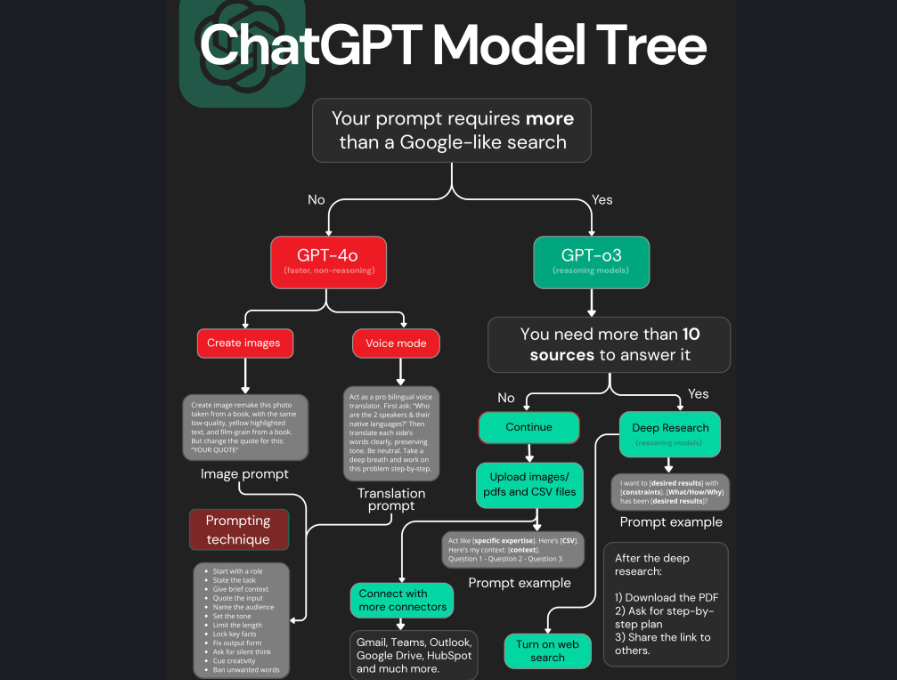
Source: Linkedin User
Why save your ChatGPT prompt tree?
Save your ChatGPT prompt tree before the next prompt. Export or copy the tree into a prompt manager, a versioned notes file, or a single-line template. Use GPT-4o for creative tasks and o3 reasoning for Google-like, multi-source research.
- Avoid losing context. Long prompt trees are fragile
- Reuse & iterate. Keep a proven structure for future prompts.
- Scale reliably. Teams can adopt your prompt workflow without guesswork.
Saving a tree is part prompt engineering, part workflow hygiene. Treat it like code: version it, test it, and label updates.
Quick 3-step checklist — which mode to pick?
Step 1 — Is it like a Google Search?
- No → Use GPT-4o (creative, open-ended, image/voice use).
- Yes → Use o3 reasoning (structured, needs citations, multi-source).
Step 2 — Need more than 10 sources?
- No → Continue with o3 (short research).
- Yes → Run deep research: gather PDFs/CSV/images and feed them into your workflow.
Step 3 — Save before you iterate
- Snapshot the tree as a single text file, or paste into a prompt manager/template library.
(This mirrors the quick decision flow in your clipboard checklist — efficient and low-friction.)
How to save & reuse — practical options
Pick one method and stick with it:
- Prompt manager / snippet tool — store labeled versions, tags, and a short description.
- Versioned notes (Git / Obsidian / Notion) — good for branching trees and diffs.
- Single-line templates — keep a copy that reconstructs the tree when pasted.
- Export as a PDF or Markdown — handy for sharing or archiving.
Pro tip: Add a tiny header to each saved file: date, engine used (GPT-4o / o3), and a one-line use case.
A compact prompt template (paste & go)
Use this template whenever you save a tree. It captures the checklist in your post and enforces consistency.
Role: [Who/what you are]
Task: [What to do]
Context: [Relevant facts or files]
Input: [The user-provided text or link]
Audience: [Who will read the output]
Goal: [What success looks like]
Length: [Max tokens / paragraphs]
Format: [bullet list, code, article]
Think: [Silent think / chain-of-thought? (no)]
Creativity: [Allow creativity? yes/no]
Banned: [Words or formats to avoid]
Drop that into your prompt manager and duplicate for each branch of the tree.
When to use GPT-4o vs o3 reasoning
- GPT-4o — best for creative rewrites, image prompts, voice translation, and anything where tone, style, or multimodal output matters.
- o3 reasoning — optimized for Google-like queries, multi-source verification, and tasks that need structured citations or deep-research workflows.
If you’re unsure, run a short pilot (2–3 prompts) in both modes and compare outputs. Save the better one to your tree.
Relevant Reads:
19 Prompt Laws for ChatGPT Success
Why You Should Use ChatGPT-o3 Instead of GPT-4o
Where to store and share your trees
- Team repo (private Git) — best for collaboration + diffs.
- Shared docs (Notion/Confluence) — accessible and searchable.
- Prompt manager — fastest retrieval for reuse.
Need inspiration? If your prompt tree generates images or feeds image workflows, check our guide Free AI Image Generator No Sign Up on TheAISurf. If you’re building automated chains of prompts, our AI Workflow Automation post shows patterns for chaining agents and versioning. For cost-sensitive projects, see OpenAI API Key Pricing: What You Need to Know before you scale.
FAQs
Q: What’s a ChatGPT prompt tree?
A prompt tree is a branching set of prompts and follow-ups you use to navigate a multi-step task. Save it so you can reproduce the exact conversation flow later.
Q: How do I version a prompt tree?
Add date + engine to the file name, store it in Git or Notion, and keep a changelog of why each change was made. Small, clear commits help rollback.
Q: Can I automate saving my prompt tree?
Some prompt managers and APIs allow programmatic export. If you use a web UI, a manual copy-paste to a versioned doc is the reliable fallback.
Conclusion
Make saving your ChatGPT tree a habit — a 30-second snapshot prevents hours of rebuild. Use the template above, store it where your team can find it, and pick the right engine (GPT-4o vs o3) based on whether you need creativity or research rigor.
Explore more AI tools on TheAISurf — bookmark the guides, experiment, and keep your prompt craft sharp.