


Ultimate Technical SEO Cheat Sheet: 10 Steps You MUST Know
- SEO
- September 28, 2025
- No Comments
Let’s be real—SEO isn’t just about keywords and backlinks. If your site’s technical foundation is shaky, Google will barely notice your amazing content. I get it; the idea of technical SEO feels like deciphering hieroglyphics at first.
But here’s the thing: once you master the basics, it’s game-changing. This cheat sheet breaks down the 10 must-know steps to get your site performing like a pro.
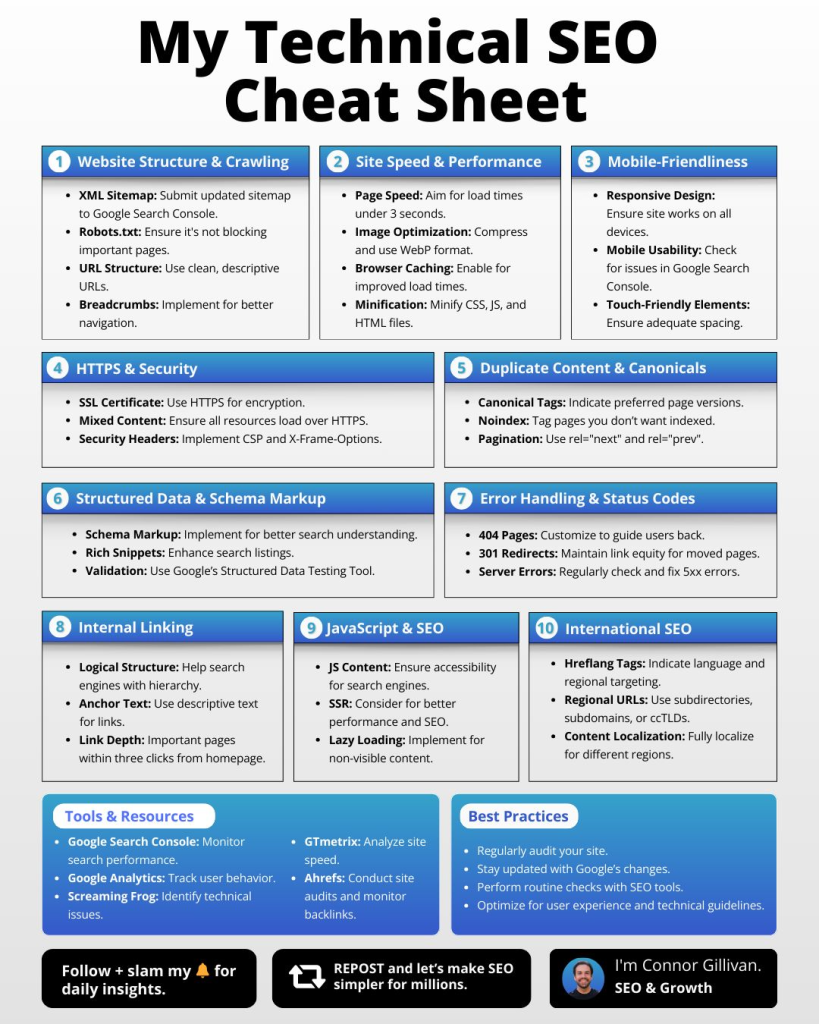
Source: Linkedin User
What is Technical SEO?
Technical SEO refers to optimizing the backend structure of your website so search engines can crawl, index, and rank it effectively. It ensures your site loads fast, is secure, mobile-friendly, and structured in a way that boosts both user experience and visibility.
1. Optimize Your Site Structure
A clean, logical site structure is the backbone of SEO. Think of it like a well-organized library: Google should know where every book (page) lives.
- Use categories and subcategories wisely
- Keep URLs short, descriptive, and keyword-friendly
- Include a clear navigation menu
Pro tip: A flat architecture (pages 2–3 clicks from homepage) helps crawlers index your site faster.
2. Boost Site Speed
Nobody likes a slow website. Google definitely doesn’t. Site speed is a ranking factor, and it directly impacts user experience.
- Compress images (WebP format is ideal)
- Minimize HTTP requests
- Use caching and CDNs
- Lazy-load heavy assets
According to Google (2024), 53% of mobile users leave a page that takes more than 3 seconds to load.
3. Mobile UX Matters
Mobile-first indexing isn’t optional. Your site must look and work flawlessly on phones and tablets.
- Responsive design
- Easy-to-tap buttons
- Readable font sizes
- Avoid intrusive pop-ups
4. Security & HTTPS
A secure website isn’t negotiable. HTTPS is a trust and ranking signal.
- Get an SSL certificate
- Redirect HTTP to HTTPS
- Regularly update software and plugins
5. Eliminate Duplicate Content
Duplicate content confuses Google and can hurt rankings.
- Use canonical tags
- Avoid publishing similar pages
- Regularly audit content
Tools like Screaming Frog can help you spot duplicates fast.
6. Implement Schema Markup
Schema markup helps search engines understand your content context.
- Add structured data for products, articles, events, and reviews
- Enable rich snippets in SERPs
- Use Google’s Structured Data Testing Tool
7. Handle Errors & Broken Links
Nothing kills UX like 404s. Fix errors to keep crawl efficiency high.
- Monitor Google Search Console
- Implement 301 redirects
- Create custom 404 pages
8. Master Internal Linking
Internal links pass authority and help users navigate your site.
- Link related posts
- Use descriptive anchor text
- Avoid over-linking
9. Optimize JavaScript
Heavy JavaScript can block crawlers if not handled correctly.
- Use server-side rendering (SSR) when possible
- Defer non-critical scripts
- Test Google’s Mobile-Friendly Tool for JS-heavy pages
10. International SEO
If you target global audiences, hreflang tags are a must.
- Specify language and region for pages
- Avoid duplicate content across regions
- Ensure URLs reflect country/language
Relevant Reads:
40 Types of SEO You Should Know in 2025
How to Build Backlinks: The Ultimate Guide
Conclusion
Technical SEO might seem daunting, but it’s all about consistent SOPs and smart implementation. Nail these 10 steps, and you’ll improve crawlability, UX, and rankings—basically leveling up your entire site.
Explore more AI tools on TheAISurf to streamline SEO, automate audits, and skyrocket your site performance.
FAQs
Q1: How often should I audit my technical SEO?
At least every 3–6 months, or after major site changes, to ensure Google can crawl and index your site efficiently.
Q2: Can technical SEO fix low rankings alone?
Not entirely. It’s the foundation. Content quality, backlinks, and UX still matter, but without solid technical SEO, your site won’t reach its potential.
Q3: Are there free tools to check technical SEO?
Yes! Google Search Console, PageSpeed Insights, Screaming Frog (lite), and Ahrefs Webmaster Tools provide robust insights.