


AI for Document Review: How Smart Assistants Streamline Modern Workflows
- Productivity
- February 26, 2026
- No Comments
Let’s be honest.
Document review is still painfully broken.
Teams spend hours jumping between PDFs, email threads, comments, and folders named Final_v7_REAL_FINAL.pdf. Reviews get delayed. Feedback gets lost. Approvals take longer than they should. And somehow, the most important document always ends up with the wrong version attached.
Our internal audits showed Business professionals, students, and creators spending hours each week on repetitive document tasks, time that could be better spent on decision-making or strategy.
That’s why AI for Document Review is quietly one of the most practical applications of AI today.
Acrobat Studio is one of the leading AI powered productivity tools for editing, summarizing, and sharing PDFs, helping business professionals, students, and creators work faster and smarter.
Not flashy.
Not experimental.
Just incredibly effective.
In this guide, we’ll break down how AI-powered document assistants are changing the way Business professionals review, summarize, and approve documents.
We will explore how platforms like Acrobat Studio are turning static PDFs into dynamic, collaborative AI workspaces.
Why Traditional Document Review Doesn’t Scale Anymore
Document review used to be simple:
- Read the file
- Leave comments
- Send feedback
That model breaks the moment you introduce:
- Multiple reviewers
- Large PDF files
- Tight deadlines
Today’s document review process is often:
- Manual
- Repetitive
- Fragmented across tools
- Slow to approve
What Is an AI Document Assistant (Really)?
A lot of tools slap “AI” on their homepage. Fewer actually help.
A Smart document Assistant is designed to actively support how creators work with documents, not just store them.
- Instantly summarize long PDFs
- Answer questions about document content
- Support AI-Powered Collaboration across teams
- Speed up Automated document approvals
- Handle batch processing multiple PDF files
You can explore how this AI-powered PDF workspace works in practice on the official Adobe Acrobat platform.
Step by Step Guide to Use AI Document Assistant for Faster PDF Reviews
1. Automated Review That Catches What Humans Miss
Instead of manually scanning every page, AI for reviewing documents can instantly analyze PDFs to:
- Flag inconsistencies
- Highlight missing sections
- Surface key insights
This kind of Automated review is especially valuable when reviewing:
- Legal documents
- Research reports
- Policy updates
- Internal documentation
It doesn’t replace human judgment, it makes human judgment faster and more accurate.
That’s the real win in streamlining document review.
2. Summarizing Documents in Seconds (Not Hours)
Instead of reading:
- 50-page reports
- Multiple interview transcripts
- Dense research PDFs
AI can synthesize everything into:
- Clear summaries
- Key takeaways
- Actionable insights
When creators need to review multiple files at once, batch processing multiple PDF files becomes a massive time saver for managing files.
This is where AI stops being “nice to have” and becomes essential.
3. AI-Powered Collaboration Inside the Document
Most collaboration still happens around documents, not inside them. Modern AI-Powered Collaboration flips that.
With the right workspace tool for documents, business professionals can:
- Ask questions directly inside PDFs
- Get AI-generated explanations
- Share insights without endless email threads
- Keep context attached to the document itself
This makes document review feel less like admin work and more like real collaboration.
4. Faster, Smarter Document Approvals
Approvals are where workflows usually break.
AI helps by:
- Identifying what actually needs review
- Summarizing changes for approvers
- Supporting Automated document approvals based on predefined rules
The result?
- Faster turnaround
- Fewer blockers
- Cleaner audit trails
And yes, fewer “just checking in” messages.
Acrobat Studio: A Real-World Example of an AI Document Workspace

One platform that brings all of this together is Acrobat Studio. Rather than treating PDFs as static files, Acrobat Studio turns them into an AI Workspace where documents, collaboration, and AI assistance live in one place.
You can see the full list of Acrobat features to better understand how editing, collaboration, and AI capabilities integrate into one workflow.
Here’s how it fits into modern document workflows.
Turning PDFs Into Conversational Knowledge Spaces
With PDF Spaces, Acrobat Studio lets teams group documents, links, and resources into shareable environments, powered by personalized AI Assistants.
Instead of searching through folders, users can:
- Ask questions about documents
- Explore insights across files
- Generate summaries and recommendations
This is document assistance done right: contextual, conversational, and practical.
AI Summarization Across Multiple Files
Acrobat Studio’s AI Assistant can synthesize insights from:
- Research reports
- User interviews
- Market analysis
- Internal documents
All into a single, actionable summary.
For professionals doing research-heavy Document Review, this kind of AI-powered productivity dramatically reduces review time and improves decision-making.
Integrated Creation, Review, and Collaboration
By combining content creation tools with trusted PDF workflows, Acrobat Studio supports:
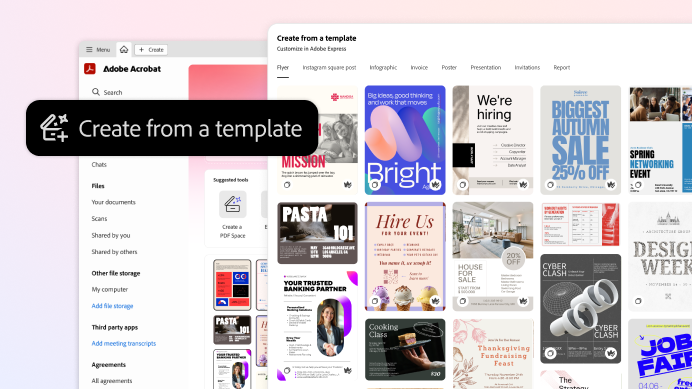
- AI document creation
- Editing and sharing in one place
- Secure collaboration across creators
When Does AI for Document Review Make the Biggest Impact?
AI document tools shine in environments where:
- Documents are complex
- Review cycles are frequent
Common use cases include:
- Legal and compliance reviews
- Marketing and research teams
- Product and UX documentation
- Operations and internal processes
Acrobat Studio vs Other AI Document Tools
AI document tools usually fall into three clear categories:
- General-purpose AI chat tools
- Traditional PDF editors with limited AI features
- Dedicated AI document workspaces built for collaboration and review
Acrobat Studio fits into the third category. It focuses on AI for Document Review, AI-Powered Collaboration, and Integrating document workflows rather than one-off document tasks.
Feature Comparison Overview
| Capability | Acrobat Studio | Generic AI Chat Tools | Traditional PDF Editors |
| AI for Document Review | Built-in and document-aware | Limited context | Minimal |
| Smart Document Assistant | Native and contextual | General-purpose only | Not available |
| AI-Powered Collaboration | Shared workspaces with AI support | Not collaboration-focused | Basic comments |
| Summarizing Documents | Single and multiple PDFs | One file at a time | Not supported |
| Batch Processing Multiple PDF Files | Supported | Manual | Manual |
| Automated Document Approvals | Workflow-based support | Not supported | Manual |
| AI Workspace for Documents | Centralized and secure | No dedicated workspace | File-based |
| AI Document Creation & Editing | Integrated creation and review | Text-first | Editing only |
For teams evaluating costs and scalability, reviewing the current Acrobat pricing plans can help determine the right fit for your document workflows.
Acrobat Studio’s secure AI assistant that can generate documents ensures your sensitive content stays protected while automating creation, review, and sharing.
What This Means for Business Professionals, Students, and Creators
First, generic AI tools help with quick questions. However, they lack structure for ongoing Document Review.
Second, traditional PDF editors handle editing well. Still, they offer limited document assistance and automation.
In contrast, Acrobat Studio combines review, summarization, collaboration, and approvals in one workspace tool for documents. As document volumes increase, teams need more than basic editing tools. They need AI-powered workflows that save time and reduce friction.
What to Look for in the Best AI Document Assistant
Not all tools are created equal. If you’re evaluating the Best AI document assistant, look for:
- Security-first AI Workspace
- Strong AI-Powered Collaboration features
- High-quality Summarizing documents capabilities
- Support for Custom AI assistants
- Seamless AI document creation and review
The best tools don’t just help you read documents, they help you think with them.
Final Thoughts: AI Is Quietly Fixing Document Review
Document review will never be glamorous.
But with the rise of AI for Document Review, it no longer has to be slow, manual, or frustrating.
If you’re specifically interested in document summarization and intelligent insights, reviewing the Acrobat AI Assistant capabilities provides a deeper look at how AI enhances document review.
By combining:
- Automated review
- Smart document assistants
- AI-powered collaboration
- Integrated workflows
Creators can finally turn documents from bottlenecks into assets.
Platforms like Acrobat Studio show what’s possible when AI is applied thoughtfully, not as hype, but as a practical layer that helps people work better with the documents they already rely on.
And honestly?
That’s exactly where AI delivers the most value.